Your cart is currently empty!
Author: James
SiFi Technology in Arb Wave Creation
Introduction to Waveform Generator Technology
Traditional function and arbitrary waveform generators have for many years been built on one common technology – DDS or Direct Digital Synthesis. DDS allows an instrument to create waveforms by tracking the phase of a reference clock and outputting the closest sample to the desired signal at each output sample time. DDS has enabled quality performance at a reasonable price for generations of function generators.
Today, new technologies are emerging that enable instruments to utilise both the advantages of DDS while improving signal fidelity and usability in more applications than ever before. Technologies like Keysight’s improving signal fidelity in waveform generators. SiFi technology was created for Rigol’s latest arbitrary waveform generator family, the DG1000Z series. These instruments combine the true point to point waveform generation of arbitrary signals and redesigned output hardware to create arbitrary waveforms with flexibility and accuracy not available a few years ago. Combine this with the available deep memory and SiFi technology enables emulation of precise arbitrary signals over longer periods without losing fidelity.Understanding DDS or Direct Digital Synthesis
The DDS method uses phase to determine the correct output over time. Let’s look at an example. Assume we have an 8192 point arb that we want to play back at 6.25 kHz. We load an arbitrary waveform made up of 400 cycles of a Sine wave. Therefore, we should have a fundamental frequency of 2.5MHz. The DDS generator assigns a phase value to each point in the wave. The first point is 0 degrees. Each point after that add an increment of 360 degrees/8192 allowing for all the points to be played in a period and the first point to be up again when it returns to 0 degrees. That increment is approximately 0.044 degrees. Driven by the clock source (often a PLL) the instrument essentially measures its phase from start every 5 ns (the instrument has a 200 MSa/sec update rate – or once every 5 nsec) and chooses the closest phase value to select from the arb table. In this example, each 5 ns represents 360 degrees/ (160 us / 5 ns) = 0.01125 degrees. Therefore, the arbitrary waveform looks like figure 1 in the UltraStation software and then the actual output values that are selected over MHz fundamental frequencies are shown in figure 2.
What is worth noting about the output is that even though we are able to output samples much faster than is required we have created some distortion. Namely, some of the points in the arb, which are all evenly spaced, are repeated for 10 ns and some will be repeated for 15 ns. The lack of smooth, continuous changes created by the file’s quantisation of the sine wave causes this distortion. The distortion is increased significantly when the playback period is adjusted slightly because the DDS algorithm is forced to make tougher decisions about which point to output since the ideal output is now further from the available points which were chosen for the initial playback period. This is critical because it is the careful sampling to generate the correct, high fidelity arbitrary signal which is the time consuming and difficult task. Using DDS, engineers who want high fidelity signals must go back and resample, recreate, and reload an arbitrary waveform whenever they want to tweak the playback period. DDS forces engineers to choose between convenient and efficient signal generation or high fidelity and accuracy during playback.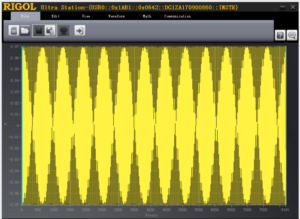
Figure 1: 400 cycles of Sine wave in an arbitrary waveform shown in Rigol UltraStation Software 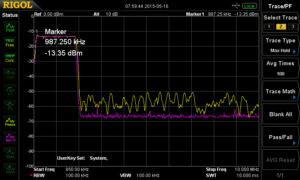
Figure 2: Arbitrary wave data table showing DDS algorithm for playback SiFi technology overcomes this basic effect on signal integrity with a new architectural approach. Let’s take the same signal and example and test it in SiFi mode. Here we load the same arbitrary wave. We simply set the output sample rate to be 8192 points * 6.125 kHz = 51.2 MSa/sec. Now, after changing that one setting we investigate the output of the signal with a spectrum analyser. The data is overlaid with the DDS mode data in Figure 3. To create this spectrum we used Max Hold on each trace while we changed the playback frequency for DDS and the output sample rate for SiFi to create fundamental frequencies between 1 and 2.5MHz. As we adjust the playback parameters in real time, DDS mode creates signal distortion at various frequencies across the 2-10 MHz band shown in yellow. Using the same exact arbitrary waveform a simple switch to SiFi mode creates much more even waveforms with significantly higher signal fidelity shown in purple.
This is a simple example of the difference between the 2 architectures, but even advanced users may be unaware of the trade-offs they are making with a traditional signal generator. Most users would assume that a 30 or 60 MHz arbitrary generator is capable of a nearly perfect 1 MHz sine wave. It all depends on the importance of signal fidelity to the application at hand. After all, many engineers look at output sample rate as a key specification but it doesn’t tell the whole story. In the example we just did, the DDS wave was being output at 200 MSa/sec while the SiFi wave was being output at about 50 MSa/sec. Still, the SiFi wave produced a much cleaner signal. The more complex the arbitrary waveform the more difficult it becomes to understand the impact of the sampling technology. Artefacts from this resampling can have profound impact on the frequency content of a true arbitrary wave and there is no way to easily separate the real wave from the sampling artefacts. This also means that buying a DDS waveform generator with a higher output sample rate invariably alters the frequency components of the signal even when playing the same arbitrary file. With SiFi technology this is not case.
Signal fidelity is critical to design engineers using waveform generators in their testing. Using a generator with SiFi technology improves the accuracy of waveforms you reproduce by allowing the engineer maximum flexibility in setting the output rate of their arbitrary waveform.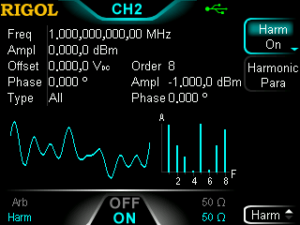
Figure 3: Comparison of 1-2.5 MHz Sinusoidal arbitrary waves. Yellow is DDS generated. Purple is SiFi technology. Enabling more functions and waveform types
Improved signal fidelity is great, but signal quality alone doesn’t make a great technology or a great instrument. Alongside Rigol’s SiFi technology is the capability to create more unique waveform types without having to build custom arbitrary waves. This includes the unique ability to build harmonic waves on the instrument front panel where the engineer describes the phase and amplitude of each harmonic element of the starting frequency. Figure 4 shows how an engineer can define a harmonic wave from the instrument’s front panel. Harmonic waves let the engineer set amplitude and phase values for the fundamental frequency up through the 8th harmonic. Traditionally, engineers who need signals which are more easily defined in RF space would have to define each frequency, amplitude, and phase and sum them together into an arbitrary wave. To create the wave in RF space the user would then have to resample the output in time domain with the correct sample spacing. This is a cumbersome way to generate and work with arbitrary waves. Harmonic waves are much easier to create. Simply define the power and phase at each frequency at a multiple of the fundamental and the instrument automatically combines them and plays them back. Figure 5 shows the matching spectrum to the signal defined in figure 4. Figure 6 is the same wave captured on a scope. This is the time domain arbitrary data a user would have to create, load, and configure on a traditional generator to get the same signal they can now quickly build from the front panel. With these new capabilities empowered by SiFi technology, the Rigol DG1000Z series waveform generators add significant power and flexibility to the engineer’s bench.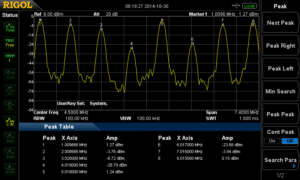
Figure 5: Harmonic Wave Spectrum Analyzer measurement 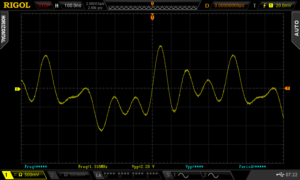
Figure 6: Harmonic Wave Oscilloscope measurement Developing Powerful and Flexible Deep Memory Arbitrary Waveforms
The key technological advance of SiFi is the ability to deliver true point to point arbitrary waves. Without this capability arbitrary waves become notoriously difficult to generate accurately and require additional behind the scenes work by engineers slightly adjusting sampling and points to improve the overall signal fidelity. This task becomes considerably more difficult when using deep memory arbs that contain millions of points. With SiFi technology, engineers can create longer, more precise arbitrary waveforms. In the adjustable sample rate mode users can define a signal that will be output at up to 60 MSa/sec. With up to 16 Million points of memory depth, it is then possible to create completely custom point to point waveforms up to 250 milliseconds in length while still maintaining the full output sample rate. The traditional difficulty with working with such long waveforms is they are a challenge to edit. For instance, Microsoft Excel 2013 only allows just over 1 million rows of data. Using a DDS generator, to make a slight change to the playback period you need to either resample the wave or deal with artefacts created by the DDS phase based sample selections. With SiFi technology, you can leave the precise waveform as sampled and simply adjust the output sample rate. This saves the considerable time and effort of editing and reloading long waveforms to the instrument.
While SiFi makes arbitrary waves easier to manipulate and more flexible once they are created, users still need a reliable method of generating, editing, and loading long waveforms to their instrument the first time. SiFi enabled generators come with free UltraStation software for waveform editing. This tool enables importing, combining, and freehand editing of deep memory waves. Waveforms can then be loaded directly to the instrument over LXI or USB. In addition to the time domain, the editing software has a spectrum view to see the power and phase of the signal you created as shown in Figure 7. The combination of deep memory, SiFi technology, and enabling editing software empowers engineers to reproduce more flexible, more precise waveforms than traditional DDS technology alone.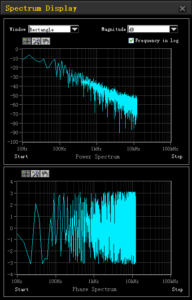
Figure 7: Arbitrary waveform spectrum view in UltraStation software Unprecedented Value
Rigol’s SiFi technology and the DG1000Z series waveform generators allow engineers to cover more signal reproduction applications than ever before with improved signal fidelity, flexibility, and ease of use. The deep memory capabilities and hardware design of the instruments work together with SiFi sampling technology to make these improvements possible and deliver unprecedented value to the engineer’s bench.Products Mentioned In This Article:
- DG1000Z Series please see HERE
SiFi 2 Technology and 16 Bit Resolution App Note
Unique waveform reproduction technology
RIGOL’s newest arbitrary waveform generators, the DG800 and DG900 Series, combine high resolution output and advanced filtering techniques in point-to-point waveform generation expanding the value of arbitrary waveform generators in test platforms. The DG800 and DG900 (shown in Figure 1) each have our new 16 bit output capability which improves the accuracy of each step in a waveform. Customisable filtering gives you more options to define how these points go together. Without recreating the waveform points change the bandwidth of a signal by precisely defining the high frequency edges. This is the essence of SIFI II technology and it makes RIGOL’s new generators some of the most customisable generators available today.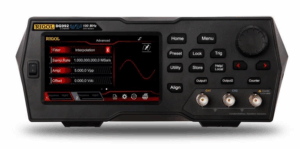
Figure 1: Rigol DG900 Series Waveform Generator High Resolution with 16 bits
Output resolution is an important characteristic of any signal generator. On modern, digital instruments resolution is measured in bits. Let’s look at a common example. Assume your signal generator has a 10 Vpp output. If the voltage level within that 10 volt swing is represented by a 14 bit number, that means that there are 2^14 or 16,384 possible output values. These are then distributed evenly so 10 volts divided by 16,384 means that each level is 610 microvolts from its neighbour. If the desired voltage level at a point in time is really between two of these levels then one level is selected as the closest option. This creates a small error in relation to the desired signal. Over time this error can make a substantial difference to the signal fidelity and ultimately to the response of the device under test.
With a 16 bit generator the same 10 volt swing is split into 2^16 or 65,536 sections. Since each of the additional bits has 2 states (0 or 1) there are 4 times as many states in a 16 bit number. With 4 times as many voltage settings available the error introduced is significantly reduced. But that isn’t the only effect. Since there are more voltage options the instrument is more often able to adjust the output taking advantage of its output rate.
Let’s take a look at how these two signals compare with an oscilloscope. Figure 2 shows the averaged waveforms from the 14 and 16 bit output. Figure 3 shows an arbitrary wave that we have created for this test. It is a standard 8192 point arbitrary wave that includes a slow ramp in voltage followed by a pulse to -5 V and then to 5 V.The purpose of the pulse activity is to make certain the generators we test are setting their output range correctly for 10 Vpp. We loaded this same arbitrary wave into two instruments. One is a 14 bit generator and one is the new DG900 Series 16 bit generator. We synchronised the outputs and set each instrument to output 1 MSample per second to make the minimum step time 1 microsecond. We then captured the outputs of both generators on the oscilloscope using heavy averaging. This reduced the noise and enabled us to view the output steps of each instrument. The oscilloscope screen is the comparison shown in Figure 2.
The purple trace is the 14 bit generator. As you can see the output changes every 6 microseconds. Even though the output is set to change every microsecond the slow ramp in the arbitrary wave only moves enough in voltage every 6 steps to trigger an actual level change in the output.
The 16 bit channel in yellow is using the same arbitrary wave file. Because the output has a smaller voltage step size it makes smaller steps and also makes them more frequently since the voltage change requested in the waveform file is 4 times as likely to trigger a change. Under these test conditions the 16 bit generator updates the output about 4 times as often and each step has 4 times the resolution.
To analyse this data further we can request it from the scope and chart it in Excel (shown in Figure 4). Here we show the data extracted from the oscilloscope for the two channels as well as the ideal ramp line we were trying to emulate, all overlaid. As shown in the inset, the RMS error of each waveform is calculated in comparison to the ideal line. The 16 bit generator reduces the RMS error of the signal by a factor greater than 2 meaning that is contains less than half the RMS error.
In cases where accuracy and signal fidelity are important, the RIGOL 16 bit generators provide significantly more capability than traditional 14 bit generators.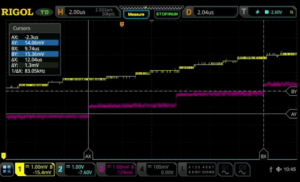
Figure 2: 14 bit vs 16 bit Oscilloscope comparison 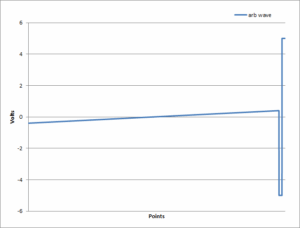
Figure 3: Sample Arbitrary Waveform 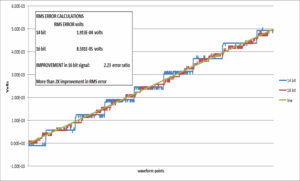
Figure 4: Comparison of emulated and ideal signals showing > 2x RMS error improvement with 16 bits Flexibility in Filtering with SiFi II
While the 16 bit resolution improves signal fidelity, how an instrument moves between points in a waveform has a dramatic effect on both the time domain and RF domain view of a signal’s characteristics. Traditional generators employed DDS (Direct Digital Synthesis) technology which selects the best output point at any time based on phase. RIGOL’s SiFi technology, which was introduced on the DG1000Z series generators employs a true point-to-point output to decrease overall signal noise versus DDS.The DG800 and DG900 Series generators are the first generators to employ SiFi II technology. These instruments utilise the point-to-point accuracy of SiFi and add filter customisation to the movement between points. This customisable setting provides flexibility for dynamic signal generation. Within the sequence menu users can select between interpolation, step, and smooth filtering. These filtering techniques change the look of the waveform in time and RF domains in ways that aren’t easy to duplicate without starting over with a new waveform on any other generator. Let’s look at a simple 1 kHz square wave. Using the standard square wave function in sequence mode utilises an 8,192 point square wave. In the sequence menu we set 8.192 MSamples per sec so that the wave repeats every 1 millisecond. Now, we can use the same wave amplitude and points in a point by point mode, but alter the output by adjusting the filtering. Figure 5 shows how the different filtering options appear on a spectrum analyser. Using a max hold trace we can see how much wideband noise is generated by each method.
Even though the primary signal is only at 1 kHz the square wave generates harmonics viewable out in MHz. By changing the filtering mode engineers can create a sharper drop-off indicative of a filtered or bandwidth limited signal path or a wide bandwidth footprint can be selected. This capability is very useful for looking at how signal conditioning and system design might affect the interpretation of the generated signal. Figure 6 shows the same 3 signals on an oscilloscope. The step filter creates a near ideal step response with limited overshoot. Consequently, there are fewer high frequency components present. The smoothing filter smooths the transitions but allows for some overshoot creating a different time domain look and a moderate amount of high frequency components. Interpolation mode creates a linear step. This step function has hard edge transitions that add significant high frequency components. The edge time in interpolation mode can be adjusted for further optimisation. We can see this in Figure 7. Here we used infinite persistence on the oscilloscope to show that the edge time can be set from 8 ns to about 90 ns in this configuration. This gives system engineers a tool for fine tuning signal response to verify their design parameters. With all of these filtering options the generated signal can be optimized to closely match whatever signal characteristics are required.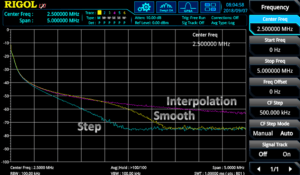
Figure 5: Comparison of SiFi II filter modes in the frequency domain 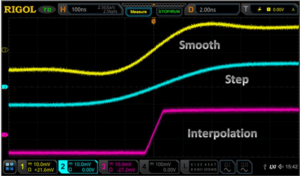
Figure 6: Comparison of SiFi II filter modes in the time domain 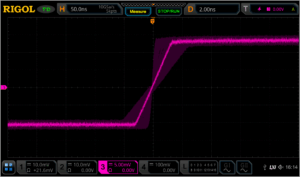
Figure 7: Range of the edge time in interpolation filter mode using SiFi II technology Unprecedented Value
RIGOL’s SiFi II technology and the DG800 and DG900 series waveform generators allow engineers to more closely reproduce signals of interest with a combination of 16 bit resolution and point to point filtering options. Signals with complex RF footprints or high fidelity requirements can now be emulated more precisely with RIGOL’s SiFi II technology in the DG800 and DG900 series arbitrary waveform generatorsProducts Mentioned In This Article:
Advanced Embedded Debug with Jitter and Real-Time Eye Analysis
Introduction
Debugging embedded communications is one of the most common tasks for electronic design engineers. Efficient Analysis of serial communications requires more than simple triggering and decoding but historically there has been a significant cost difference between the oscilloscopes with mixed signal, serial triggering, and serial decode capabilities and the high performance instruments with advanced analysis. Engineers need the ability to test long term signal quality characteristics including jitter and eye patterns without investing in high performance, high cost solutions.
The MSO8000 (Figure 1) provides the most complete analysis capabilities, deepest memory, and highest sample rate in its class. Built for embedded design and debug, the MSO8000 is designed to enable engineers to speed verification and debug of serial communications on a budget. Let’s look at how class leading sampling, memory, and analysis can be used debug complex signal quickly and easily with the help of Jitter and Eye Analysis.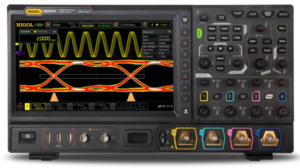
Figure 1: The MSO8000 High Performance Oscilloscope Characterizing Jitter
Clock precision is critical to high performance digital data transmission. Subtle changes in clock frequency affect error rates and data throughput, but these timing errors can’t be visualized easily in a traditional oscilloscope view. Jitter analysis can be done on these types of signals. Utilizing the high sample rate and the deep memory, the oscilloscope compares the changes in time between thousands of clock transitions. This makes it possible to visualize timing fluctuations below 100 picoseconds while also tracking changes in clock timing over long time periods.One of the keys to visualizing jitter is the TIE or Time Interval Error. The Time Interval Error is the difference in time between the occurrences of the expected and the actual clock edge. There are two main visualization tools we use with TIE for debugging. First, is the TIE trend graph. This shows the accumulated error in time of the TIE values. This trend is a valuable debug tool since it highlights periodic types of jitter. Figure 2 shows the high speed clock signal on channel 1 (yellow) and the TIE Jitter trend in purple. The vertical axis units for the TIE trend shown here is 10 nanoseconds per division. The trend shows that the jitter TIE accumulates periodically. That implies a periodic signal or event is affecting the clock frequency. Next, investigate the TIE trend with measurements or cursors as shown in Figure 3. The cursors make it easy to view the period of the signal and calculate the frequency as well (1/DX). Direct measurements of the TIE Trend can also be made. The period of these changes are an important clue as to the root cause of any jitter issues.
In addition to the TIE trend you can also calculate the distribution of the TIE values. The shape and standard deviation of the TIE values is an important component of determining root cause. For the signal above the histogram is shown in Figure 4.
When using the TIE trend and distribution to debug and solve jitter related issues it is important to understand the nature of the TIE values and trend. Remember, that TIE is calculated as the accumulated changes in the period of the underlying signal. This means that the TIE graph looks like the integral of changes in the period. Therefore, the triangle wave shown in the figures so far represent a square wave change in the period. This is critical to understanding how to debug signal jitter. The TIE trend shows the period changes lengthening linearly (triangle rising) and then the period changes shortening linearly (triangle falling). When TIE is increasing linearly, the period must be longer than the expected period, but at a fixed value since the sum is linear. When TIE is decreasing linearly, the period is at a fixed value shorter than expected. Therefore, the period is changing between 2 fixed values at this frequency. One is just above and one is just below the expected period. We are therefore looking for a 10 kHz square wave that is somehow affecting our clock timing. We can learn from the histogram that this fluctuation appears to be constant as the TIE distribution is evenly and symmetrically spread across those values.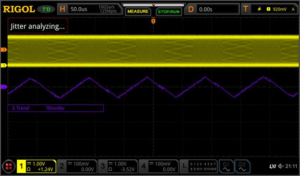
Figure 2: TIE trend graph showing periodic jitter 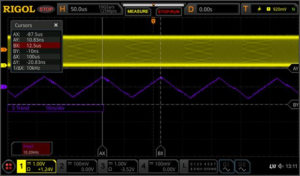
Figure 3: TIE trend graph cursor measurements 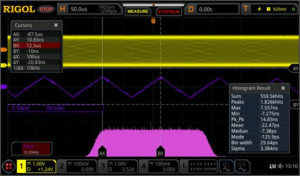
Figure 4: TIE trend and TIE Histogram After testing different nearby signals on our device under test, we find a time correlated square wave (Figure 5) shown in blue at that frequency that is affecting our serial clock timing.
Jitter can often be caused by issues with PLLs, power fluctuations, or emissions, among others. Let’s look at some use cases where the histogram data is important to correct jitter analysis.
Figure 6 shows a bimodal distribution of the TIE values in the histogram with a sinusoidal TIE trend. Here we can see the standard deviation (sigma in the histogram statistics) is about 3.2 ns. Since these trends have a mean value of close to zero, the standard deviation can also be approximated as the RMS value of the signal (shown in the RMS measurement in the bottom left). Since both sinusoidal waves and triangle waves have an integral that appear visually sinusoidal it can be difficult to discern whether the underlying changes to the clock period are more triangular or sinusoidal. The standard deviation and the histogram are additional tools that can help to determine what signals might be interfering. Often, signal timing shows a sharper correction or snapback to the nominal timing as the clock is realigned. Visually this can look like more of a ramp or saw wave. The histogram can help to visualize the asymmetry if the signal drifts slowly and then is corrected quickly. Figure 7 is a good example of an asymmetrical jitter distribution that still appears nearly sinusoidal in the jitter TIE trend. A distribution like this makes it easier to pinpoint the process that might be causing the fluctuations.
One important key to jitter measurements is to remember that this is about data integrity and ultimately about errors that cost the system time or bandwidth. In other words, it isn’t just about how much the timing might fluctuate but how your receiver views the data. For this reason it is important to test the signal for jitter in the way that the receiver is also determining the clock settings. In serial communications the clock can be explicit, meaning that there is a clock line transmitted for this purpose. There may also be a constant clock speed defined by the communication standard. It is also common for the receiver to ‘recover’ the clock from the signal itself using a PLL circuit.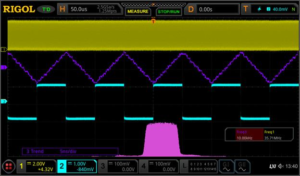
Figure 5: Finding root cause with Jitter analysis 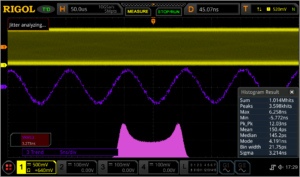
Figure 6: Standard Deviation of the histogram 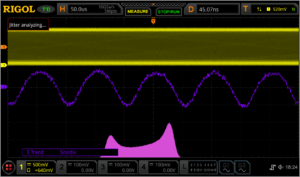
Figure 7: Asymmetry in the histogram results The design of the receiver has an outsized effect on jitter and timing. If the receiver uses a constant clock rate at a 70 Mb/sec rate the jitter appears as shown in the figures above. If the receiver uses a 1st order PLL with 200 kHz of bandwidth it can eliminate much of the low frequency jitter we saw at 10 kHz. This is shown in Figure 8. The MSO8000 can emulate explicit, constant, 1st order PLL, and 2nd order PLL clock recovery systems to precisely measure the jitter or eye diagram as it will be seen by the receiver. These are important capabilities to accurately debug critical timing issues and ignoring insignificant issues. Once we are correctly emulating the clock recovery and have removed key causes of jitter, we can zoom in on the TIE Trend to 500 picoseconds per division (Figure 9). We still see some periodic fluctuations but they have been reduced significantly and may no longer have any impact on the bit error rate. Once, all the jitter has been adequately addressed in the system you can view noise sources below 500 picoseconds per division as shown in Figure 10. The MSO8000 Oscilloscope also enables a direct statistical table view of the TIE values as well as Cycle to Cycle values and values calculated from both the positive and negative widths. Together, these jitter tools make it possible to carefully visualize and analyse timing issues in vital serial communication links.
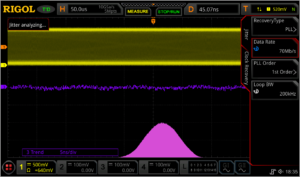
Figure 8: Dynamic Clock Recovery 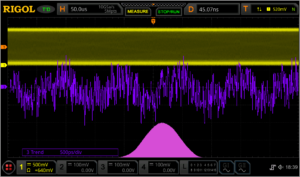
Figure 9: Remaining Jitter 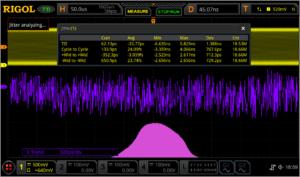
Figure 10: Jitter Measurements Signal Quality & the Eye Diagram
Timing is only one of the characteristics that contribute to overall signal quality. The goal of all signal quality analysis is to reduce data error in the transceiver link. Errors are often caused by timing and clock issues, but problems stemming from bandwidth, grounding, noise, and impedance matching all can impact how a bit is interpreted by the receiver. The best method for visualizing the holistic data signal quality is the eye pattern or eye diagram test. Real-time eye diagrams are a great way to validate and debug serial data links where throughput and bit error rate are important to system performance.
The eye diagram analyses the data line aligning the bit timing with the recovered clock. The same clock recovery options are available here as in the jitter toolkit. They eye diagram is then created by lining up and overlaying each bit. A density plot is then created from what can be thousands of bit sequences. This is called an eye pattern or eye diagram because the shape in the center resembles an open eye that closes to a point on each side. The goal is to have an open eye where the bit level (0 or 1) is correctly interpreted at the center of the eye.The eye pattern in Figure 11 shows some potential issues. Depending on the user settable thresholds, the instrument calculates the width and height of the eye. This signal has a bandwidth limitation. We can interpret that because the slope of the rising and falling edges on each side of the eye is not as steep as our design planned for. Analytically, we can determine this by comparing the eye height, eye width, and signal risetime on the screen to our design documents. There also appears to be some frequency uncertainty with regard to the recovered clock. We can see from the histogram that the distribution of the period is not Gaussian implying some non-random causality to the frequency shifts. Lastly, there is some noise causing the amplitude to fluctuate. This closes the eye vertically.
Using the eye diagram as a visual debug tool, evaluate the cables and connections. Also, look for layout, cross-talk, or other emissions that might be impacting signal quality. Once we remove the signal causing the frequency fluctuations we see the eye start to open in Figure 12. The purple histogram now shows that the remaining timing errors are at least symmetrical. This also improves the eye width in the eye measurements window.
Figure 13 is the result once we identified and removed the nearby noise source. This improves the eye height and width and the entire signal is more precise. Now it is clear that the rising and falling bit transitions don’t reach the same high or low level as the non-transitioning bits. We also see that the rising and falling edges themselves have about a 45° slope with these time and voltage settings. The design document indicates that this should be higher. This is likely a bandwidth issue that is both limiting the risetime of the transitions and causing the eye to close vertically when the signal does not return all the way to its peak or base by the middle of the bit.
Finally, Figure 14 demonstrates improved bandwidth after changing our transmitter circuit. The histogram distribution shows that this has also removed some of the outliers in the signal timing. The improved bandwidth shows clearly in the improved Risetime as well as a completely open vertical eye.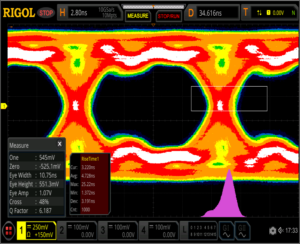
Figure 11: Eye Diagram of signal causing errors 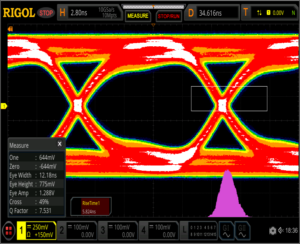
Figure 12: Eye Diagram with improved timing 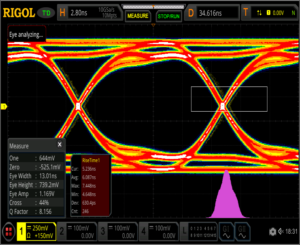
Figure 13: Eye Diagram with improved noise 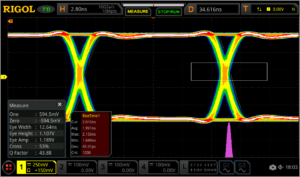
Figure 14: Eye Diagram after debugging and improvements Conclusions
Embedded design and debugging of digital data is a critical requirement in modern electronic products. Modern high performance digital oscilloscopes expand the analysis capabilities available to the everyday engineer’s bench. RIGOL’s UltraVision II technology and our MSO8000 Series oscilloscopes (Figure 15) complete these tools with jitter and eye diagram analysis options making complete signal quality analysis affordable and easy to use. Jitter and eye diagram analysis on the MSO8000 simplifies viewing, analysing, and resolving issues involving timing, noise, bandwidth, and overall signal quality in serial data links. With new analysis capabilities built on the deep memory and high sample rate of the UltraVision II platform, RIGOL’s MSO8000 Series oscilloscopes are the high performance debugging tool of choice for today’s embedded engineer.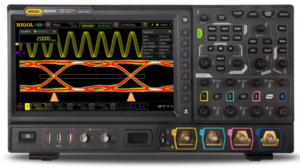
Figure 15: The MSO8000 High Performance Oscilloscope Products Mentioned In This Article:
- MSO8000 Series please see HERE
Bode Plot Analysis of switching Power Supplies
Overview
A Bode plot is a graph that maps the frequency response of the system. It was first introduced by Hendrik Wade Bode in 1940.
The Bode plot consists of the Bode magnitude plot and the Bode phase plot. Both the amplitude and phase graphs are plotted against the frequency. The horizontal axis is lgω (logarithmic scale to the base of 10), and the logarithmic scale is used. The vertical axis of the Bode magnitude plot is 20lg (dB), and the linear scale is used, with the unit in decibel (dB). The vertical axis of the Bode phase plot uses the linear scale, with the unit in degree (°). Usually, the Bode magnitude plot and the Bode phase plot are placed up and down, with the Bode magnitude plot at the top, with their respective vertical axis being aligned. This is convenient to observe the magnitude and phase value at the same frequency, as shown in the following figure.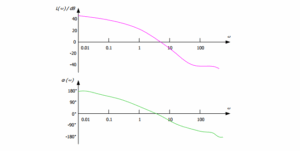
The loop analysis test method is as follows: Inject a sine-wave signal with constantly changing frequencies into a switching power supply circuit as the interference signal, and then judge the ability of the circuit system in adjusting the interference signal at various frequencies according to its output.
This method is commonly used in the test for the switching power supply circuit. The measurement results of the changes in the gain and phase of the output voltage can be output to form a curve, which shows the changes of the injection signal along with the frequency variation. The Bode plot enables you to analyse the gain margin and phase margin of the switching power supply circuit to determine its stability.Principle
The switching power supply is a typical feedback loop control system, and its feedback gain model is as follows:
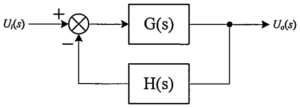
From the above formula, you can find out the cause for the instability of the closed-loop system: Given 1 + T(s) =0, the interference fluctuation of the system is infinite.
The instability arises from two aspects:
1) when the magnitude of the open-loop transfer function is:
2) when the phase of the open-loop transfer function is:
The above is the theoretical value. In fact, to maintain the stability of the circuit system, you need to spare a certain amount of margin. Here we introduce two important terms:
- PM: phase margin.
When the gain |T(s)| is 1, the phase <T(s) cannot be -180° . At this time, the distance between <T(s) and -180° is the phase margin. PM refers to the amount of phase, which can be increased or decreased without making the system unstable. The greater the PM, the greater the stability of the system, and the slower the system response. - GM: gain margin.
When the phase <T(s)is -180°, the gain |T(s)| cannot be 1. At this time, the distance between |T(s)| and 1 is the gain margin. The gain margin is expressed in dB. If |T(s)| is greater than 1, then the gain margin is a positive value. If |T(s)| is smaller than 1, then the gain margin is a negative value. The positive gain margin indicates that the system is
stable, and the negative one indicates that the system is unstable.
The following figure is the Bode plot. The curve in purple shows that the loop system gain varies with frequency. The curve in green indicates the variation of the loop system phase with frequency. In the figure, the frequency at which the GM is 0 dB is called “crossover frequency”.
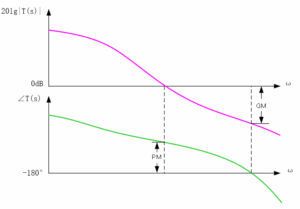
The principle of the Bode plot is simple, and its demonstration is clear. It evaluates the stability of the closed-loop system with the open-loop gain of the system.
Loop Test Environment Setup
The following figure is the circuit topology diagram of the loop analysis test for the switching power supply by using RIGOL’s MSO5000 series digital oscilloscope. The loop test environment is set up as follows:
1. Connect a 5Ω injection resistor Rinj to the feedback circuit, as indicated by the red circle in the following figure.
2. Connect the GI connector of the MSO5000 series digital oscilloscope to an isolated transformer. The swept sine-wave signal output from the oscilloscope’s built-in waveform generator is connected in parallel to the two ends of the injection resistor Rinj through the isolated transformer.
3. Use the probe that connects the two analogue channels of the MSO5000 series digital oscilloscope (e.g. RIGOL’s PVP2350 probe) to measure the injection and output ends of the swept signal.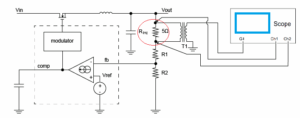
The following figure is the physical connection diagram of the test environment.
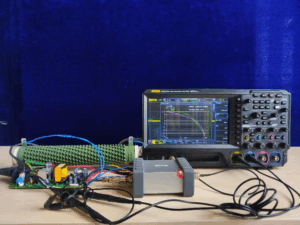
Operation Procedures
The following section introduces how to use RIGOL’s MSO5000 series digital oscilloscope to carry out the loop analysis. The operation procedures are shown in the figure below.

Step 1 To Enable the Bode Plot Function
You can also enable the touch screen and then tap the function navigation icon at the lower-left corner of the screen to open the function navigation. Then, tap the “Bode” icon to open the “Bode” setting menu.
Step 2 To Set the Swept Signal
Press Amp/Freq Set. to enter the amplitude/frequency setting menu. Then the Bode Set window is displayed. You can tap the input field of various parameters on the touch screen to set the parameters by inputting values with the pop-up numeric keypad. Press Var.Amp. continuously to enable or disable the voltage amplitude of the swept signal in the different frequency ranges.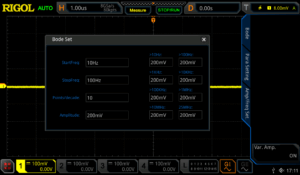
The definitions for the parameters on the screen are shown in the following table.
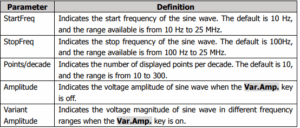
Note:
The set “StopFreq” must be greater than the “StartFreq”.
Press Sweep Type, and rotate the multifunction knob to select the desired sweep type, and then press down the knob to select it. You can also enable the touch screen to select it.- Lin: the frequency of the swept sine wave varies linearly with the time.
- Log: the frequency of the swept sine wave varies logarithmically with the time.
Step 3 To Set the Input/Output Source
As shown in the circuit topology diagram in Loop Test Environment Setup, the input source acquires the injection signal through the analog channel of the oscilloscope, and the output source acquires the output signal of the device under test (DUT) through the analog channel of the oscilloscope. Set the output and input sources by the following operation methods.
Press In and rotate the multifunction knob to select the desired channel, and then press down the knob to select it. You can also enable the touch screen to select it.
Press Out and rotate the multifunction knob to select the desired channel, and then press down the knob to select it. You can also enable the touch screen to select it.
Step 4 To Enable the Loop Analysis Test
In the Bode setting, the initial running status shows “Start” under the Run Status key. Press this key, and then the Bode Wave window is displayed. In the window, you can see that a Bode plot is drawing. At this time, tap the “Bode Wave” window, the Run Status menu is displayed. Under the menu, “Stop” is shown under the Run Status menu.Step 5 To View the Measurement Results from the Bode Plot
After the Bode plot has been completed drawing, the Run Status menu shows “Start” again. You can view the Bode plot in the Bode Wave window, as shown in the following figure.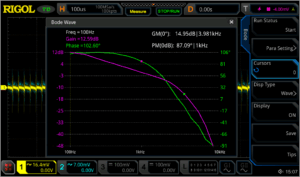
The following table lists the descriptions for the main elements in the Bode plot.
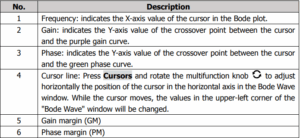
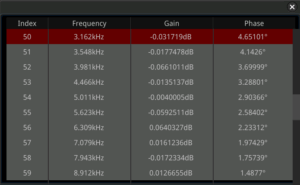
Press Disp Type and rotate the multifunction knob to select “Chart” as the display type of the Bode plot. The following table will be displayed, and you can view the parameters of the measurement results for loop analysis test.
Step 6 To Save the Bode Plot File
After the test has been completed, save the test results as a specified file type with a specified filename.
Press File Type to select the file type for saving the Bode plot. The available file types include “*.png”, “*.bmp”, “*.csv”, and “*.html”. When you select “*.png” or “*.bmp” as the file type, the Bode plot will be saved as a form of waveform. When you select “*.csv” or “*.html”, the Bode plot will be saved as a form of chart.
Press File Name, input the filename for the Bode plot in the pop-up numeric keypad.Key Points in Operation
When performing the loop analysis test for the switching power supply, pay attention to the following points when injecting the test stimulus signal.
Selection of the Interference Signal Injection Location
We make use of feedback to inject the interference signal. Generally speaking, in the voltage-feedback switching power supply circuit, we usually put the injection resistor between the output voltage point and the voltage dividing resistor of the feedback loop. In the current-feedback switching power supply circuit, put the injection resistor behind the feedback circuit.
Selection of the Injection Resistor
When choosing the injection resistor, keep in mind that the injection resistor you select should not affect the system stability. As the voltage dividing resistor is generally a type that is at or above kΩ level, the impedance of the injection resistor that you select should be between 5Ω and 10Ω.
Selection of Voltage Amplitude of the Injected Interference Signal
You can attempt to try the amplitude of the injected signal from 1/20 to 1/5 of the output voltage.If the voltage of the injected signal is too large, this will make the switching power supply be a nonlinear circuit, resulting in measurement distortion. If the voltage of the injected signal in the low frequency band is too small, it will cause a low signal-to-noise ratio and large interference.
Usually we tend to use a higher voltage amplitude when the injection signal frequency is low, and use a lower voltage amplitude when the injection signal frequency is higher. By selecting different voltage amplitudes in different frequency bands of the injection signal, we can obtain more accurate measurement results. MSO5000 series digital oscilloscope supports the swept signal with variable output frequencies. For details, refer to the function of the Var.Amp. key introduced in Step 2 To Set the Swept Signal.
Selection of the Frequency Band for the Injected Interference Signal
The frequency sweep range of the injection signal should be near the crossover frequency, which makes it easy to observe the phase margin and gain margin in the generated Bode plot. In general, the crossover frequency of the system is between 1/20 and 1/5 of the switching frequency, and the frequency band of the injection signal can be selected within this frequency range.Experience
The switching power supply is a typical feedback control system, and it has two important indicators: system response and system stability. The system response refers to the speed required for the power supply to quickly adjust when the load changes or the input voltage changes. System stability is the ability of the system in suppressing the input interference signals of different frequencies.
The greater the phase margin, the slower the system response. The smaller the phase margin, the poorer the system stability. Similarly, if the crossing frequency is too high, the system stability will be affected; if it is too low, the system response will be slow. To balance the system response and stability, we share you the following experience:
● The crossing frequency is recommended to be 1/20 to 1/5 of the switching frequency.● The phase margin should be greater than 45°. 45° to 80° is recommended.
● The gain margin is recommended to be greater than 10 dB.
Summary
RIGOL’s MSO5000 series digital oscilloscope can generate the swept signal of the specified range by controlling the built-in signal generator module and output the signal to the switching power supply to carry out loop analysis test. The Bode plot generated from the test can display the gain and phase variations of the system under different frequencies. From the plot, you can see the phase margin, gain margin, crossover frequency, and other important parameters. The Bode plot function is easy to operate, and engineers may find it convenient in analysing the circuit system stability.
Upgrade Method
Online Upgrade
After the oscilloscope is connected to network (if you do not have the access to the Internet, please ask the administrator to open the specified network authority) via the LAN interface, you can perform online upgrading for the system software.
1) Enable the touch screen and then tap the function navigation icon at the lower-left corner of the touch screen to enable the function navigation.
2) Tap the “Help” icon, and then the “Help” menu is displayed on the screen.
3) Press Online upgrade or enable the touch screen to tap “Online upgrade”, then a “System Update Information” window is displayed, requesting you whether to accept or cancel “RIGOL PRODUCT ONLINE UPGRADE SERVICE TERMS”. Tap “Accept” to start online upgrade. Tap “Cancel” to cancel the online upgrade.For the local upgrade, please download the latest firmware from the following website and then perform the upgrade.
Products Mentioned In This Article:
- PM: phase margin.
Debug & Analysis of IoT Power Requirements
Power and Function
The relationship between power and function in an Internet of Things (IoT) project is perhaps the most fundamental trade-off a design team needs to address; therefore, it must be made with definitive, testable goals from the customer’s perspective. Expert product development always begins with the an IoT development where the final product is a wrapper around the ‘big idea’, but it is all the more important because of it. It can be tempting to design a product around a battery the engineering team has used before or a display they know how to integrate. This design approach focuses on solutions the engineering team can visualise and not what would satisfy or delight the customer. Instead, viewed through a user’s lens, the product may need to work for a week while recharging only once overnight. It may be important to be on instantly when needed or it may work just as well to push a button to wake the device for use. A battery warning may be required or a sleep mode may be acceptable. The best way to truly understand the options is to start with a definition of as many customer use models as reasonable. Ultimately, there is a trade-off between size/weight and use time/energy but there are many choices for optimization and a testing framework can assist in these determinations.
Estimating Power Usage in Development
An important first step is always to estimate the power required to collect data, make decisions, and take responding action within the requirements of your device. Estimating this usage over time in a theoretical model from specifications of components is useful, but ultimately rigorous, iterative use case testing is important to really understanding your power needs. In a modern IoT platform this measurement may not be straight forward.
A low power System on Chip (SoC) for IoT development may specify a power draw for the low energy Bluetooth (BLE) radio of 5-10 mA but that isn’t transmitting constantly. Depending on the power modes available a device could use tens of milliamps in operating mode while consuming less than several microamps in a global system sleep mode. Additionally, with a lot of chip development focused in this area the state of the art is always changing.
Power Test Methodologies
Traditional electronics battery power consumption could be measured simply with a digital multimeter (DMM) monitoring the current draw over time. Today’s IoT platforms may be more complicated. Often, a pulsed draw that is too quick for a typical DMM to measure is utilized. This requires a faster measurement system to verify. The IoT platform may provide a current measurement test point. An oscilloscope typically uses this to measure the voltage around a small sense resistor in the battery circuit. Depending on the accuracy and resolution you need this may be an effective technique. For instance, if a 10 Ohm resistor is used then every mA results in 10 mV. With a typical oscilloscope noise floor near 1-2 mV this may be noisy. Another option would be to use a current probe to capture the signal. The noise performance may not be as good but the connections are significantly easier if no current measurement test point is provided.
After establishing the best measurement technique for your system, I prefer to begin with a static measurement to establish baseline performance. Typically, I would use a standard example program. In this case, we will view the current draw from a simple program that toggles several LEDs. In this mode, we measure a baseline of about 5 mA. As shown in figure 1, activating each LED also requires 10-12 mA of current on this baseline.
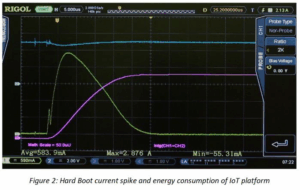
Second, establish a start-up or bootup power requirement for the system. Here, we conducted a test from a hard boot. In addition to power we are also monitoring the energy usage using the integration of voltage * current over time as an approximation. Refer to Figure 2. Understanding the start-up power requirements from different boot states is critical to optimizing the design for sleep or shutdown power mode usage.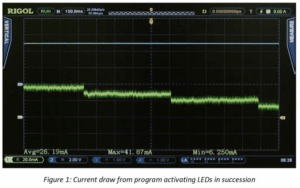
Not all of the peripherals utilize power in a DC fashion like LEDs. Test other peripherals you are using to see how they pull power from the battery. A simple test of the SPI bus demonstrates power being drawn in a pulsed fashion. Analysing the amplitude, width, and repetition rate of these current pulses (shown in Figure 3) enables us to understand the power usage.
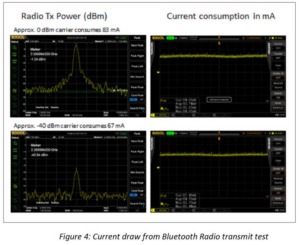
We can use a similar method to test the actual output power of the Bluetooth radio as well as the battery power used during the transmission. This is important once the complete RF antenna layout is completed since power shortages here could result from reflections or mismatch in the RF path. In the test, we leave the Bluetooth Low Energy radio in a constant power transmit to easily monitor the power consumption. In a real use case, the transmit function is never constant, but the power values here are a guide to optimization in on time and power for the radio use cases. In the results below, a transmit power of 0 dBm resulted in 83 mA of power usage while a transmit power of -40 dBm resulted in 67 mA of current. Even in an off state, the radio example uses significant power to prep the radio and peripherals. These baseline values help us to determine the radio power and transmit cycles that may fit into our customer use cases. RF and DC power are shown for these 2 cases in Figure 4.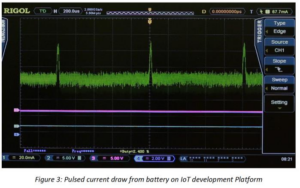
Once we have determined typical power levels by state and peripheral usage, the next step is to verify that there are no other effects contributing to power usage when in a more dynamic mode of switching operational states. We can test our code examples using a function to both measure instantaneous power and energy over time. With this approach, we can now determine the energy usage of an approach over time and see how different sleep algorithms generally affect battery life. With this level of information, code optimization in response to customer needs becomes much simpler.
In order to complete the IoT design and get a product to market quickly and cost effectively, our information on power usage in different setups and modes is an invaluable tool. The completed tests have enabled us to gather information about static state power usage for our platform and our required peripherals. We also have details on sleep states and boot power from which we can make informed decisions about trade-offs between battery size and use times in our customer use models. With a basic understanding of how power is consumed in our system we can use this as a guideline for incremental improvements throughout our design cycle. For instance, we better understand the advantage of waiting to service the peripherals vs. putting the whole system into sleep mode for a short period. These decisions can then be validated and refined as your application and use cases become clear.
Conclusions and Key Learnings
When working in the fast-changing atmosphere of IoT design and development, reliable test methodologies become increasingly important. As engineers integrate the newest sensors and platforms on the fly to reach highly competitive markets as fast as possible, understanding core customer requirements and trade-offs and how those can be evaluated and compared throughout the development is an important step toward improving the strategic design process.
Whether the challenges of an application are more form or function, issues related to battery life and power usage are fundamental elements of design in the IoT ecosystem that play a significant role in market success. Establishing these principles early in the process and testing them iteratively is one of the best ways to limit budget and schedule risks in the latter stages of the design. Modern, easy to use test equipment that is more affordable than ever can be utilized to develop the limits and baselines that will guide an engineering team through a successful product development.Products Mentioned In This Article:
- Digital Multimeters please see HERE
Utilising Deep Memory with Rigol DS1000 Oscilloscope
Long Memory Storage with Rigol Oscilloscopes
Some Digital scopes offer the capability of capturing waveforms in Long Memory mode. Utilising the long memory, Rigol scopes can capture complex signals in great detail over extended time periods. This allows an observer to examine high frequency effects within the captured waveform.
How to use Long Memory Mode on the DS1000D/E Series scopes?- Enter the Acquire menu by pressing the Acquire button
- Set the Memory Depth field to Long Memory
Sampling rate and Long Memory:
Using the DS1000E and DS1000D Series Rigol digital scopes, users can access the long memory mode to get up to 512Kpts in dual channel mode and up to 1Mpts in single channel mode. In comparison, standard memory depth for oscilloscopes range from 1000pts – 16Kpts.
This high sampling rate is a big advantage when observing signals where the application requires capturing a longer waveform, but also needs to confirm higher frequency components within the signal.
The best way to visualise these higher frequency components is to use the zoom feature. By pushing the Horizontal knob, you can enter zoom mode. In this screen shot you see a 0.5 second waveform in yellow across the top. In the lower section we have zoomed in to 10 usec/division. Since we are sampling in normal mode you can see the distance between two data points. A straight line connects data points and you can see where the signal rises between samples and is clearly being linearly interpolated. On the
DS1000D/E Series scopes this normal mode operation has 16 Kpts per wave.
Since the overall wave is set to 50 msec/div the 10 divisions across the screen make the wave 0.5 seconds. 16 Kpts spread across 0.5 seconds means there is one sample approximately every 32 usec. This is confirmed by the screen shot.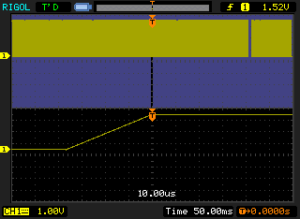
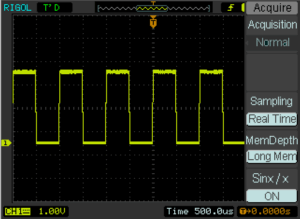
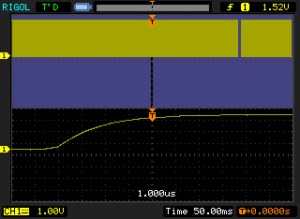
Using the method above to switch the scope to deep memory mode we can see the increased sampling rate below. In this image the increased data rate is seen by observing the real shape of the rise time. Now with the increased sampling we have 1 million points over 0.5 seconds for one sample about every 500 nsec.
In conclusion, memory depth is an important feature to consider when selecting an oscilloscope because high frequency components can be important to the analysis, triggering, and monitoring of signals. Memory Depth combined with maximum sampling rates, waveform acquisition rates, and an oscilloscope’s display quality all impact the overall ease of capturing and analysing data with your oscilloscope.
Products Mentioned In This Article:
- DS1000E Series please see HERE
Debug and Analysis Considerations for Optimising Signal Integrity in your Internet of Things Design
Introduction
As the Internet of Things continues to expand to include applications including home automation, fitness, video, and tracking as well as traditional embedded electronics use cases the needs for testing and optimising these designs become clearer. Even as IoT expands, the test requirements have begun to crystallise into a set of capabilities that can assist a design team in achieving their goals. This is especially important given the smaller, more versatile teams and companies charting a path in IoT. As companies and engineers often new to large scale design work attempt to make new types of successful consumer products, IoT projects will continue to progress in fits and starts until designers find the optimal mix of form and function for each target audience creating reliability and annoyances like additional time required to charge the IoT device. By first considering test requirements as a method for evaluating these concerns, a design team can speed time to market and ultimately reduce the iterations required to create a successful product platform. Selecting the best test equipment for the task at hand also enables engineers to stay within their start-up budget requirements. Signal integrity is a key design aspects whose importance is magnified by these inherent trade-offs in the IoT landscape. Focusing on signal integrity as a key indicator of the optimal approach for an IoT application from debug through final design enables a small IoT design team to leverage their capabilities and ultimately reward their customers with performance and ease. Here we will be discussing important examples of signal integrity test methodologies for IoT devices and how they impact the user experience from form to function.From and Reliability
It is crucial to consider how dramatically signal integrity and reliability are affected by mechanical implementation. The trend for IoT products, especially wearables, continues to be sleeker, lighter, and smaller. Optimising the form of the product for users is therefore often in conflict with reliability, ruggedness, and signal integrity requirements. Designs that strike a balance too close to the aesthetic ideal often fail to succeed for these core functional reasons. With more demand for waterproof and rugged designs that also integrate accelerometers and other sensors we create an environment on our device where signal integrity can often be compromised. This can lead to shorter battery life, user feedback delay, and even critical data or system faults.
Let us test a few examples looking for issues in communication on our SPI peripheral bus. The SPI bus is a common communication protocol for accelerometers, GPS chips, and many other sensor and actuators. Continuously monitoring a design to make certain reliable communication will be maintained to quality standards is an important test technique for this type of product development. In these tests, we will provide several methods for verifying and comparing SPI communication that can be used iteratively as your design approaches completion.
First, there are several aspects of serial communication that can be commonly affected by connections, layout, and stress or other aspects of long term use. These include bandwidth, noise, and impedance. Again, our first goal is to establish both a goal and a baseline for these parameters. The first step is to monitor and verify these signals with the analogue channels of an oscilloscope as shown in Figure 1.
In this test we can see that our connections appear to have more than enough bandwidth but we can also see some crosstalk noise especially on the data and chip select lines. The green bus values are an internal decode of that signal by the scope. As long as these are stable for each transmission then the noise is likely acceptable. Since crosstalk is a common issue here it can be important to test the bus while other peripherals are being serviced and activated asynchronously. One methodology is to utilise a pass/fail mask, which we have implemented in Figure 2, looking for unacceptable noise levels in a large sequence of traces.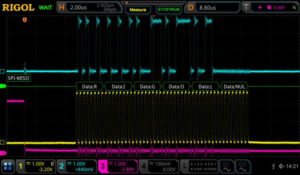
Figure 1: Basic SPI Analysis with analogue oscilloscope channels 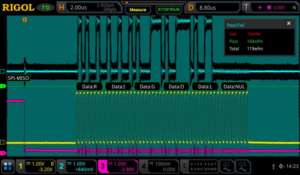
Figure 2: Pass / Fail Analysis to highlight crosstalk on a communication bus One advantage to this approach is that masks can easily be saved and reused on different board revisions or code revisions within a project. Simple tests can therefore help to quickly identify the version or build that first showed an increase in noise or change in performance. It is important to internalise that the opposite can be true as well. Device performance may be so reliable that different layouts or smaller wires for connections may be possible creating more freedom for the overall mechanical design.
When there are issues with bandwidth or signal levels impedance may ultimately be the culprit. High impedance probing is made to deliver maximum voltage to the scope, but many serial buses have characteristic impedance such as 50 Ohms. In these cases, a valuable test is to transmit signals directly into a 50 Ohm probe setting on the oscilloscope. This makes it possible to visualise what the 50 Ohm receiving end sees during a transmission. If the impedance of the cabling, connections, or transmitter is off then the amplitude may droop or square waves may be misshapen. Regardless of the impedance of your lines, there are RC components that affect the risetime and overshoot of the transitions. Selecting the wrong termination resistors for your bus can cause extraneous power drain or poor transmission settling. System bandwidth and line impedance issues can be caused by these resistances as well as excessive or unstable capacitance. Like noise, these symptoms usually indicate physical hardware issues beyond basic valid data transmissions. When significant data errors or bugs do come into play another verification method can be used. To get a clearer image of how our IoT platform is interpreting this data we can use our mixed signal channels for comparison.
The digital channels on the oscilloscope (shown on the bottom of Figure 3) can be set with threshold values that mimic the bus controller on the IoT platform.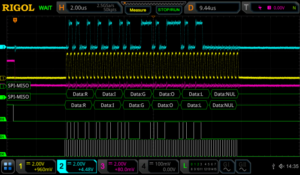
Figure 3: Comparison with mixed signal channels for data interpretation The device does not see the analogue signals, but interprets their digital equivalent. Therefore, when having data issues it is important to look at both the digital and analogue representation. This enables engineers to quickly discover where data failures are occurring as well as the analogue root cause or noise source that may be contributing.
Lastly, one important consideration when implementing sensors in an IoT device is the latency between bus communication and action. Of course, this is highly dependent on both the platform and the code methodology and can change dramatically. Latency is the time it takes for the system or platform to interpret the peripheral data and take an action. As a latency baseline we ran a simple test that toggles an LED when a SPI read is completed. The cursor measurements on Figure 4 highlight this.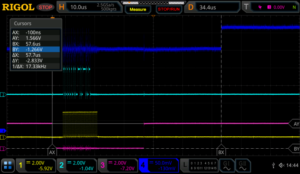
Figure 4: Latency measurement from SPI bus to LED on our IoT development board From this baseline on your platform you can model how code changes impacts this latency and then you can base decisions about servicing these sensors based on the balance of use case and reliability requirements with battery life and implementation.
Latency, noise, bandwidth, and impedance all effect signal integrity and reliability. These key measurement techniques can be used throughout development, use case, and reliability testing to optimise the overall design and anticipate failure modes. As part of an overall IoT design strategy, continuous evaluation of signal integrity established baselines and limits helps speed time to market and customer acceptance with small impact to equipment budgets.
Conclusions and Key Learnings
When working in the fast changing atmosphere of IoT design and development reliable test methodologies become increasingly important. As engineers integrate the newest sensors and platforms on the fly to reach highly competitive markets as fast as possible, understanding core customer requirements and trade-offs and how those can be evaluated and compared throughout the development is an important step toward improving the strategic design process.
Whether the challenges of an application are more form or function, issues related to signal integrity and reliability are fundamental elements of design in the IoT ecosystem that play a significant role in market success. Establishing these principles early in the process and testing them iteratively is one of the best ways to limit budget and schedule risks in the latter stages of the design. Modern, easy to use test equipment that is more affordable than ever can be utilised to develop the limits and baselines that will guide an engineering team through a successful product development.Products Mentioned In This Article:
- DS1000Z Series please see HERE
Meeting Embedded Design Challenges with Mixed Signal Oscilloscopes
Introduction
Embedded design and especially design work utilising low speed serial signalling is one of the fastest growing areas of digital electronics design. The need to communicate between modules, FPGAs, and processors within a wide array of consumer and industrial electronics is increasing at an astounding rate. Customised communication protocol and bus usage is critical to design efficiency and time to market, but comes with the risk of being sometimes difficult to analyse and debug. The most common sources and types of problems when using low speed serial data in an embedded application include timing, noise, signal quality, and data. We will recommend debug tips and features available in modern oscilloscopes that will make debugging these complex systems faster and easier.
Types of Errors
Timing
Timing is critical in any serial data system, but finding the system timing limitations related to components, transmission length, processing time, and other variables can be difficult. Let’s start with a simple 16 bit DAC circuit. First, make sure you understand the data and timing specifications for the protocol in use. Does it sample data right on the clock edge? How far off can the clock and data be when we still expect good data? In other words: do we have a clock sync error budget defined? Once we understand these timing requirements then we can experimentally verify both the Tx and Rx hardware subsystems. Now we can analyse the system level timing delays and the overall accuracy of the conversions because we can make direct measurements of both the logic and analogue channels in a time correlated fashion. We will also be able to simultaneously view the decoded bit patterns numerically on an oscilloscope that comes in well below your budget limits.
Here is a simple example of measuring a bit on channel 2 (blue) that is driving the DAC output that is creating the Sine wave on channel 1 (yellow).Utilising parallel bus decoding (Figure 1) we can get a quick look at the transitions of this single line. But this doesn’t give us all the information we need since the DAC is utilising a number of data lines to set its output level. Getting more complete data requires a different approach. Let’s move all the DAC lines (Figure 2) over to the MSO’s digital inputs. Now we can see how the digital lines really coordinate with the DAC output. To investigate further we can simplify the decoding to show Hex values (Figure 3) and zoom in so we can view the decoded data.
Now we can use the zoom feature to clearly see the relationship between the bit and DAC transitions (Figure 4). For the zoom we have turned on analogue channel 2 in blue that is on the DAC clock. Zoomed in by a factor of 500x from 50 usec per division to 100 nsec per division allows us to see that the bit transitions are occurring 100 nsec before the clock transition. The clock transitions in under 5 nsec and the DAC output starts changing in sync with the clock. We can also utilise the scope cursors to make the timing in the transitions clearer and well defined (Figure 5).
Verifying timing in mixed signal systems can be made easier with the right tools. Select a modern scope with the correct set of channels and options to make sure you can easily view what you need on the display when you need it. From digital buses to processing delays, get the full picture of the device’s operation and delve into details as needed to verify timing issues on your device.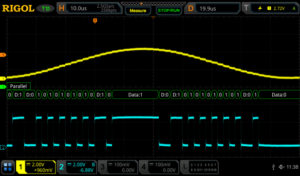
Figure 1: DAC output and input bit on a RIGOL MSO5354 Digital Oscilloscope 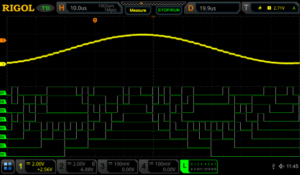
Figure 2: DAC output and 8 bit input bus on a RIGOL MSO5354 Digital Oscilloscope 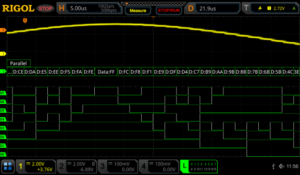
Figure 3: DAC output and 8 bit input bus with Hex decode on a RIGOL MSO5354 Digital Oscilloscope 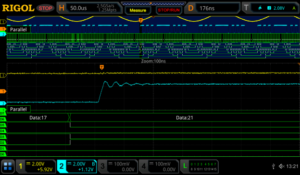
Figure 4: DAC output and 8 bit input bus zoomed in on a RIGOL MSO5354 Digital Oscilloscope We can also trigger on the digital patterns instead of the analogue signal (Figure 6). Triggering on a digital pattern can be critical for debugging when there is a problem. There isn’t always a good way to track events from the analogue side of a system. When using a digital trigger method make sure to set the additional trigger parameters. These may include start bits or even address and data for some protocols. Even for a simple parallel bus like this you need to define and arrange the channels in the bus for the results to be easiest to interpret.
Accurate timing of Low Speed Serial signals is critical to system stability. Therefore, making sure your measurement tools are up to the task of precise and easy triggering, monitoring, and analysing of your waveforms is vital to improved R&D efficiency and ultimately time to market.Noise
One of the most common issues in correct serial data measurements is the handling of system noise. Noise in these measurements can come from a number of sources including poor grounding, bandwidth issues, crosstalk, electromagnetic immunity (EMI) problems. Sometimes the problem is in the device, but improved probing and measurement techniques can also improve the results significantly without changing the device under test. A good first step is always to make sure we are using best measurement practices.
Here is a decoded I2C bus segment using a 5000 series oscilloscope (Figure 7). In the first example we have extremely poor grounding on our probes. Because the scope’s ground is tied directly to power ground signals that need to float or simply use a different or noisy ground plane can cause results like this. It is also possible for high current draw through ground in local power to create ground loops that can cause noise to be injected in your system. We solve these problems in order from easy to difficult. First, we can look at our probe connections. Normally, we would use the alligator clip ground strap that connects on the probe to make a ground connection. Assuming we are doing that correctly and still having a problem we may need to use the ground spring instead. The ground spring connects closer to the probe tip and significantly reduces the loop area of the connection. This can significantly improve noise and signal quality (Figure 8) especially for high speed signals or signals sensitive to capacitance or coupled voltages.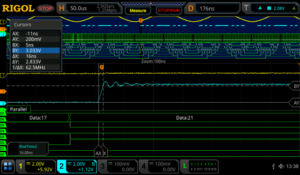
Figure 5: DAC output and 8 bit input bus zoomed in with cursors shown on a RIGOL MSO5354 Digital Oscilloscope 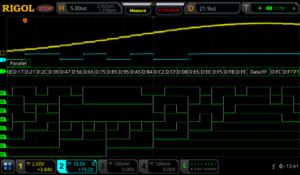
Figure 6: DAC output and 8 bit input bus triggered by a digital pattern on a RIGOL MSO5354 Digital Oscilloscope 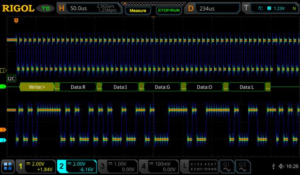
Figure 7: I2C clock and data with noise from poor grounding in a colour graded display using a RIGOL MSO5354 Digital Oscilloscope 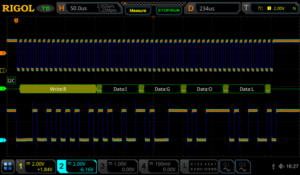
Figure 8: I2C clock and data with ground noise improved in a colour graded display using a RIGOL MSO5354 Digital Oscilloscope All RIGOL probes come with both the standard ground strap and the ground spring for these types of measurements.
If ground noise is still an issue, try isolating your device from ground. The scope operates best grounded to AC power ground via the plug. If the rest of the device or system being tested can be isolated from ground this eliminates ground loops. If ground noise is still an issue you may consider a differential probe like the RP1100D (Figure 9) which enables measurements without reference to ground on the scope. Differential measurements may be the only way to clearly view some low speed serial data such as a LVDS bus (Low Voltage Differential Signalling). Buses like this purposely move the reference line to maximise bandwidth and increase communication distances, but it may require true differential probing or the use of multiple channels of your scope together to view the signal correctly. RIGOL has several different probe types for these measurements including the RP1000D series differential probes typically used for high voltage floating applications and the RP7150 1.5 GHz differential probe (Figure 10) for high speed data applications.Now that we have improved our signal to noise ratio by decreasing noise injected from the ground, we can turn our attention to bandwidth filtering. High frequency noise can also enter your measurements via channel to channel cross talk or other high frequency sources nearby or within your
device. One way to address this is to utilise the channel bandwidth limits (Figure 11). Every RIGOL scope channel can limit the bandwidth to the ADC. A 20 MHz limit is pretty standard. Some scopes will have higher options as well.
Additionally, there are a few acquisition mode and triggering settings that can improve performance in the face of noise. Many trigger types have a menu item allowing you to turn on noise rejection for the triggering scheme. The 5000 series even includes HFR and LFR (high and low frequency rejection) as options in how to couple the signal triggered on. The 5000 series comes with High Res or High Resolution mode (Figure 12). This feature uses extra oversampling that is being done behind the scenes on many measurements to provide an average that results in less noise. This is best to use if you are able to set the sampling to take at least 200 samples per time division. This will average rather than reject high frequency signals, so be sure to understand your potential error sources and how they may interact with your measurement setup. Finally, the 5000 series scope also has an NRJ (noise reject) feature directly within the trigger menu. This removes noise that appears in bursts and can be set in time rather than frequency.
To further isolate and locate sources of noise within your system you may want to focus on EMC or EMI related issues. To further investigate these error sources please download the EMC Precompliance app note for use with the Rigol DSA815 Spectrum Analyser at http://www.rigolna.com/EMCNoise is always a concern when working with low speed serial signals. By definition these signals continue to go to higher speeds, more advanced encoding, farther transmission distances, and lower voltage and power levels. All of these trends make hardware more susceptible to noise. Making careful measurements that limit or eliminate adding noise to our system then enables us to focus on noise in the system that may still cause long term design issues.
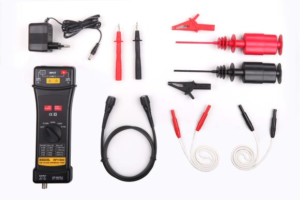
Figure 9: RP1100D 100 MHz Differential Probe 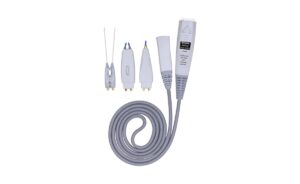
Figure 10: RP7150 1.5 GHz Differential Probe 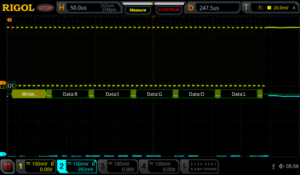
Figure 11: I2C clock data with reduced noise using bandwidth limit on a RIGOL MSO5354 Digital Oscilloscope 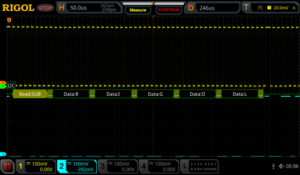
Figure 12: I2C clock and data using high resolution mode on a RIGOL MSO5354 Digital Oscilloscope Signal Quality
Monitoring and improving the quality of low speed serial signals is a critical part of the debugging process. Issues like impedance mismatches, bandwidth, and loading errors can all effect the quality of signals even when noise isn’t present. Now that we are looking more closely at the exact nature of these signals it is important to verify the way we are using our oscilloscope for these tests. For signal quality tests we will be using the analogue channels because they provide the best look at what is actually occurring with our signals. This requires some additional forethought. To clearly see data transitions, we should definitely use a sampling rate that is as high as possible. Sampling at 5x the bit rate of the digital bus should be considered the minimum because of the high frequency components that we need to visualise. Sampling at 10 times the bit rate should enable us to seeany of the issues. But when we decode the signal the scope likely uses a subset of the full memory data to handle the decode analysis. This can be important because you don’t necessarily want to decode being performed at too high of a rate. That can mask problems you will find when a more nominal receiver is used to decode the data. On RIGOL scopes the decode is done on 1 Mpts of memory spread across the acquisition. By setting the memory depth and the time per division the user can determine whether they want the decode to be done directly from the analogue points or from a subset. Decoding is also shown across the display region. To capture more decoded bytes than you can view on the display use the event table function (Figure 13). You can also export the table results to a text file from the event table menu for record keeping or offline timing analysis.
Here is an example table of how the memory depth, time per division, and sample rate effect the actual decode sample rate on a MSO5000 Series. Based on your serial data speeds and the receiver you will eventually use to collect the serial data you can optimise your serial decode rate.Now that we have set and verified our sampling times for best analogue and decoding results, we also want to set our display up for optimal triggering conditions. When triggering on the rising edge of an analogue signal make sure to keep the trigger level at least 1 division away from the signal low state. This separation allows for consistent
triggering action without any false triggers. When visualising digital signals with the analogue channels use more screen real estate when possible. Using about 2 vertical divisions and about ½ to 1 horizontal division per decode character will allow you to see any major overshoot or impedance issues as well as some of the other types of error we will be looking at. Here is the setup (Figure 14) I prefer to monitor decoded data on a bus like RS232.
On a more complex bus like I2C we view both clock and data lines on the screen. The timing correlation between multiline buses is, of course, vital to successful decoding. Making critical measurements on the screen like risetime and overshoot for each line makes reliability tests simple to setup. We can view the measurements in max/min or using standard deviation notation for more advanced statistical testing (Figure 15).
In addition to the risetime and overshoot for the 4 serial bus lines you can also see the jitter in the clock when compared to the data transition. This test device appears to have the clock transition occur about 1.6 microseconds of jitter on the clock when viewed, as above, in reference to the triggering data transition. In (Figure 16) we zoom in on the data transition to get a more accurate measurement of the risetime and overshoot.
Signal quality encompasses many of the types of issues you find on LSS buses. Efficient debug means making the most of your embedded analysis capabilities to find signal discrepancies that can lead you to design changes as early as possible in your design process. A mixed signal oscilloscope is the perfect tool for measuring signal quality (Figure 17) from risetime variance to ASCII packet data.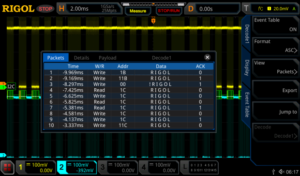
Figure 13: I2C clock and data event table view using a RIGOL MSO5354 Digital Oscilloscope 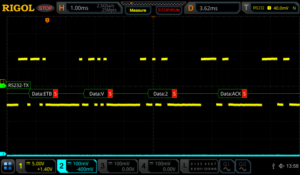
Figure 14: RS232 optional decoded data view settings using a RIGOL MSO5354 Digital Oscilloscope 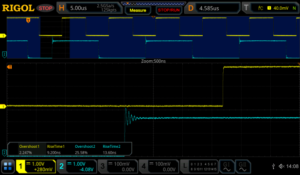
Figure 15: I2C clock and data min/max signal measurements using a RIGOL MSO5354 Digital Oscilloscope 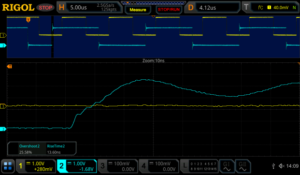
Figure 16: I2C zoom in on data risetime measurement using a RIGOL MSO5354 Digital Oscilloscope Data
The key to any Low Speed Serial application is the ability to quickly and easily look at the data being transmitted. This means adding the capability to do embedded decoding on your oscilloscope. Decoding affects both the triggering and display on the scope. It adds a decoded bus display to the instrument’s screen. You can decode values as ASCII or as hex, octal, or binary data depending on what you want to look at. You can also trigger on these values to make sure you are looking at the packets of most interest to you (Figure 18). In addition to triggering on these signals with the decode specific trigger you are also able to trigger on any type of signal with a zone trigger which allows you to not only to trigger on any type of signal but also exclude any unwanted noise or data from a signal. These are created by simply drawing a rectangle on the screen of the instrument (Figure 19).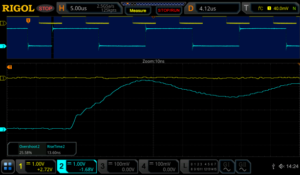
Figure 17: I2C data measurements with standard deviation using a RIGOL MSO5354 Digital Oscilloscope 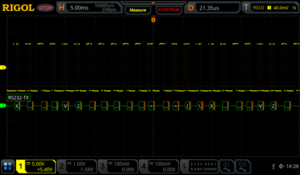
Figure 18: RS232 optimal decoded data view settings using a RIGOL MSO5354 Digital Oscilloscope 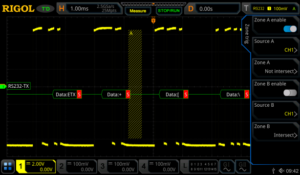
Figure 19: A zone trigger is added to exclude part of the RS232 signal. 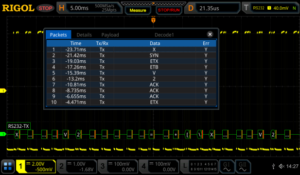
Figure 20: RS232 event table capture of multiple transmissions using a RIGOL MSO5354 Digital Oscilloscope If you are interested in timing between packets or evaluating more than one or two consecutive packets of data, use the event table mode (Figure 20) to generate a list of data packets on a wider time base. Additionally, with using an event table you are easily able to move around on the decoded signal by stopping the instrument from sampling and then select your desired trigger point in the packet’s submenu on the event table then press the Jump To button to move to the desired trigger point on the captured signal (Figure 21).
You can always utilise the zoom function to see the signals and data from an individual packet in that series (Figure 22).
Another way to view this signal is by using the search and navigation menu. This allows you to view multiple trigger points and easily move around on the signal when the scope has stopped scanning. All of the trigger points are represented on the search and navigation menu and they correspond to the white triangles at the top of the screen. The trigger point that is highlighted on the table corresponds with the red triangle at the top of the screen (Figure23).
To view how decoded segments, differ over time or compare between triggered events when other signals might be affecting the results the best analysis method is often to use record mode. RIGOL’s record mode enables you to capture thousands of frames around a trigger event. Once captured, you can use pass/fail or a trace difference analysis mode to visualise changes from frame to frame (Figure 24).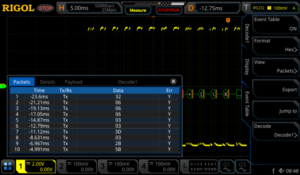
Figure 21: RS232 Event used to move around on the signal by using the Jump To soft key. 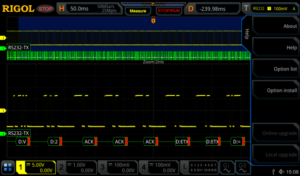
Figure 22: RS232 packet view using zoom mode on a RIGOL MSO5354 Digital Oscilloscope 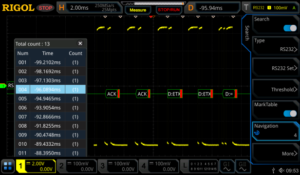
Figure 23: Using Search and Navigation feature to move around on the RS232 signal. 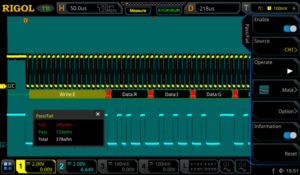
Figure 24: I2C with pass/fail analysis enabled using a RIGOL MSO5354 Digital Oscilloscope These recordings can be stored and played back as a movie as well, but the analysis features let you search for failures or outliers while also viewing decoded data for comparison (Figure 25).
Data errors as well as the debugging process are always closely tied to the protocol and its specifications. To be efficient with your test equipment make sure you are utilising the best analysis method to easily view the data you need to see without extraneous results getting in your way.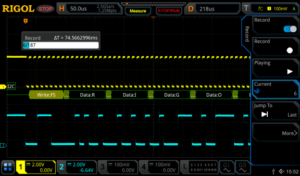
Figure 25: I2C transmission record mode in playback using a RIGOL MSO5354 Digital Oscilloscope Keys to Look Out For
Proper Oversampling & Bandwidth
As discussed, proper sampling is critical to making correct measurements as well as completely debugging your low speed serial signal. A good rule of thumb for analogue signals is 5x the bandwidth of the signal you want to measure. This limits your risetime error to about 2%. To view the best detail on high frequency signal components set up your scope to achieve 5-10X over sampling as well. When digital signals this means sampling 5 times in the width of one bit. When sampling on digital lines or for sampling that will be used for decoding oversampling is less important but set up your measurement device so it is as similar as the LSS receiver you will ultimately be using. This gives you the best chance to focus on material errors that will cause problems down the road.Grounding, Noise, and Differential Signalling Proper probing and understanding the use of
differential vs. ground referenced signals is important to debugging. If your data lines are not ground referenced make sure to understand the impact of ground loops and ground coupled noise on your measurements. Use proper probe techniques and advanced noise cancelling features on the scope to limit noise sources. If necessary, add differential probes to your measurement system to improve measurement quality.
How to Best View Low Speed Serial Signals There are a number of methods for analysing,
viewing, and evaluating LSS bus activity on a modern oscilloscope. The best way differs depending on whether you want to look at a single bit transition for noise, speed, or synchronization; whether you want to look at a complete packet of data; or if you want to compare packets and packet timing over a longer time period. Make sure your bench tools allow you to see everything you need and familiarise yourself with features like zoom, record mode, search and navigation, event tables, deep memory, and automatic measurements as well as how they interact and how best to transition between them when considering your test plan. Ideally, an oscilloscope empowers you to view all the results you need and quickly switch modes to acquire additional information.Conclusions
Embedded design and debugging of digital data is a growing test requirement in a broad range of consumer and industrial applications. Having the right mixed signal oscilloscope can make viewing, analysing, and resolving issues including timing, noise, signal quality, and data easier and faster. This improves engineering efficiency and time to market. RIGOL’s line of UltraVision II enabled oscilloscopes comes with standard or optional capabilities for the methods and measurements discussed here and are powerful benchtop instruments that provide uncompromising performance at unprecedented value.Products Mentioned In This Article:

Kikusui PCR-WE/WE2 Series Application Software
For the full PDF of Application Software for the PCR-WE/WE2 Series AC/DC Power Supply please click on the PDF image below.


Kikusui PWX Series – Take control of your Power Testing.
Kikusui PWX DC Power Programmable Supply – 750W or 1.5kW, LAN , RS232, USB and rack-able
PWX is a new series of DC power supply in only 1U height, for rack or bench use. With outstanding power per volume, all models allow Constant Volts or Constant Current operation. A 19-inch wide geometry allows close stacking on top of each other is achieved by cooling design with air flowing from the front to the back. With USB, RS-232C, and LAN interfaces as standard, an essential for system upgrades, PWX PSUs come complete with virtual multi-channel bus (VMCB). This facility supports many architectures for remote control and monitoring: 1-to-N, or N-to-M topologies, thereby supporting very large-scale applications. With a network interface offering LXI compliance*, it is easy to monitor and also to control your power supplies from any networkable browser: a PC, smartphone, or tablet, for example, bringing freedom of location to your systems management.
Powerful yet simple configuration via PWX’s LAN interface
To configure PWX, simply connect your PC, or route to the PWX via a hub, using a LAN connection. If you want to work with many machines in specific combinations, create a virtual group using the VMCB features: up to 255 virtual groups are configurable, and up to 31 units per group. A group can have a mixture of models you need.
Easy monitoring and control of a live PWX using built-in web server
As well as setting up, the browser on your PC and many smartphones/tablets can also be used for active control and live monitoring. Simply access the applications for control on the web server built into the PWX series.
Wide Operating Range: up to 3-times the capability – see chart operating region
A wide range of voltage and current outputs are available from PWX, via output power auto-ranging (a factor of three across the range). For example, the 1500 W output power model PWX1500ML functions continuously across the range of ‘80 V-18.75 A’ to ‘26.8 V-56 A’.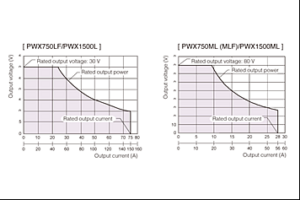
Sequence Creation Application Software SD013-PWX (Wavy for PWX)
Automated testing applications are accommodated using the optional Wavy for PWX. The Wavy application software enables sequenced data to be edited and uploaded to the PWX for complex testing solutions.Kikusui’s new PWX Range includes this wide range of DC power instruments:
PWX750LF – Wide Range DC Power Supply 1U 750W, 0~30V/0~75A
PWX1500L – Wide Range DC Power Supply 1U 1500W, 0~30V/0~150A
PWX750MLF – Wide Range DC Power Supply 1U 750W, 0~80V/0~28A
PWX1500ML – Wide Range DC Power Supply 1U 1500W, 0~80V/0~56A
PWX750MHF – Wide Range DC Power Supply 1U 750W, 0~230V/0~10A
PWX1500MH – Wide Range DC Power Supply 1U 1500W, 0~230V/0~20A
PWX750HF – Wide Range DC Power Supply 1U 750W, 0~650V/0~3.5A
PWX1500H – Wide Range DC Power Supply 1U 1500W, 0~650V/0~7AFull specification in pdf: Click HERE
Telonic Instruments Ltd. is a stock holding distributor able to provide many models quickly.
A hire option is also available for many instruments from Telonic Instruments Ltd.
For more information:
Telonic Instruments Ltd Telonic is an ISO9001 Registered company.Phone
0118 9786911
Fax
0118 9792338Web Address
www.telonic.co.uk
RIGOL´s new Solution for EMI pre-compliance tests
VNA Mode for Real-Time Spectrum Analysers
Enhanced EMI measurement function and a simple user-friendly operating environment complete RIGOL’s real time spectrum analyser versions RSA3000N and RSA5000N.
Electromagnetic compatibility [EMC] has become one of the most important topics in the last 23 years. EMC activities during design phase are absolutely mandatory to ensure the functionality of development and to protect the environment from electro smog. Each new development must be tested in a test laboratory in accordance with related standards in order to be CE certified. This certification is necessary to bring a new product to the market. Different standards are used depending what kind of product is designed. For example standard CISPR 22 (EN55022) needs to be passed for an “information technology equipment” [ITE] like a MP3 player or a modem (telecommunication). Each standard specifies frequency ranges for conducted and radiated emission of a product and defines maximum limits in dBµV for each analysis. Pre-compliance analysis is very important during design stage because it’s estimated that ~50% of products fail the first acceptance test. A second full compliance test is very expensive and time consuming. But also a re-design has a strong financial impact and uncalculated additional time is necessary which is a question of cost in the end as well. In order to avoid this scenario, initial EMC analysis and measurements are necessary at a very early stage of development and must be carried out throughout development, including pre-compliance checks. A survey1 shows that the average cost of EMC activities during development is at ~3-5% of whole development cost. However, if these activities will not be performed and the compliance test is failed, the cost of post- development can be arise up to 50% to 100% of the actual planned cost. For EMC analysis and pre-compliance control, RIGOL has been offering since years solution with spectrum analysers of the series DSA800 (including 6 dB filters and quasi-peak value detector [QP]) and PC Software S1210, as well as a near-field probe set NFP-3. This solution has now been extended and optimised in the RSA3000N/RSA5000N series. This makes it possible to simplify EMC analysis considerably and also offers even more advanced analysis capabilities.
EMI Problematic
EMC2 was implemented to generate a peaceful coexistence between transmitter and receiver of electromagnetic energy. Also unwanted transmitting and receiving are within this definition. Furthermore EMC should protect the recourse “electromagnetic spectrum”. Three main elements are defined in EMI (see figure 1).
Source of Interference – Coupling Path – Susceptible Device
The source of interference could come from e.g. parasitic back coupling effects from an amplifier or an electromagnetic transmission of an electric / electronic facility. Due to different coupling path the disturbance will be coupled to the susceptible device. This interference could cause different failure rates in functionality at the EMI receptor (susceptible device):
1.) Performance degradation
2.) Function failure
3.) Equipment damage (worst case)To avoid such kind of scenario it is important to detect the root cause including coupling mechanism at DUT. The EMI interferences could be transmitted via different coupling path. For lower frequency ranges the interferences are mainly transmitted via line connection (like for power, data bus, analogue lines, RF connection) because the wavelength (λ)3 is bigger than the geometry and electrical and magnetically field are independent. Both fields don’t propagate and a quasi-static approach is necessary (analysis of inductive / capacitive elements). The line connections need to be tested if unwanted interferences occurring during / after activation of DUT at these lines. This kind of test is named conducted emission.
When the wavelength of a DUT is equal or smaller than its frame, then magnetic and electric field are no longer independent and they start to combine to an electromagnetic field (EM). If e.g. the geometry has 6 * λ then the EM field is no longer only at the source, propagation happens and the DUT start to send out an EM wave (its acting as an antenna). Unwanted interferences with EM waves are named radiated emission. In the near field of the EM source a quasi-static approach is necessary.
The occurrence of interferences is in most cases unforeseen and difficult to detect because different coupling effects could be root cause of interferences. For a device under test there are two main influences of interferences. First one is an interference which is related within one DUT and has an influence of functionality within the device under design. These interferences are intra-system disturbances which will be occurred e.g. crosstalk effects.
On the other side, the DUT might be affecting a complete different independent system with EMI interferences which are inter-system disturbances. For example, at a radio it could be happened that a specific noise is hearable over the speaker when a mobile phone is ringing.
Interferences could be coupled by:
– Galvanic coupling (G-C): when two electric circuits using same impedance (e.g. same GND)
– Inductive coupling (I-C): when two (or more) conductor loops with current flow influence each other with magnetic field
– Capacitive coupling (C-C): when two electric circuits have different voltage potential – Electromagnetic coupling (EM-C): Wavelength is smaller than the geometry and EM wave radiated to environment of DUT and / or other sections of DUT.To find a root cause coupling path in a DUT is very difficult, because coupling path could also be a combination of different couplings (e.g. G-C and C-C. at the same time). To find a solution for a detected coupling path is comparatively simple.
The next part of this document describes the test tool RSA5000N with the new EMI mode which is the tool for pre-compliance analysis.
EMI Mode of Real Time Spectrum Analyser RSA5000N / RSA3000N
The RSA5000N / RSA3000N are multifunctional spectrum analyser including a general purpose spectrum analyser [GPSA], a real time analyser [RTSA], a vector signal analyser [VSA], vector network analyser [VNA] and an EMI mode for pre-compliance tests. Therefore these devices are the best combination of high performance and flexibility and an optimal test solution for EMI pre-compliance analysis. For some EMI measurements, the real time mode could be a big benefit for some analysis to get a better overall picture of the problem or see more behaviour of DUT. The GPSA mode could be used to measure single components of a DUT like an amplifier and with VSA mode, the modulation quality or BER of an RF output could be measured e.g. during susceptibility stress.
The new EMI mode offers a lot of new functionalities and advantages for pre-compliance tests and will be described in detail:
Scan Table
During the conformity check (conducted and radiated emission / susceptibility), a test receiver [TR] is generally used in a test laboratory. However, a TR has several disadvantages. It is a very expensive test tool and only usable in the field of EMC. A spectrum analyser [SA] on the other hand, measures faster and can be used for different applications and is significantly cheaper, especially at RIGOL. However, a TR has significant advantages in EMC measurements comparing to an SA. TR using a pre-selection which allows to use a different dynamic range for each partial measurement. In addition, the desired frequency resolution (usually RBW/2 and sometimes RBW/4) is easily achieved in a TR. The SA fulfils the most of CISPR 16.1 requirements and the results are a very good approximation, which is absolutely sufficient to perform pre-compliance tests. A TR fulfills CISPR 16.1 for 100% and can also be used for compliance tests. RIGOL´s new EMI solution in the RSA5000N / RSA3000N compensates most of the disadvantages with the scan table. The most used frequency ranges inclusive the correct 6 dB RBW filter for EMC tests are pre-defined in 10 individual ranges (see figure 2). All pre-defined settings can be modified / stored according to the own need. In order to compensate these disadvantages in a SA, the EMI solution of RIGOL stores the basic setting of the most important frequency bands, including the 6 dB RBW required, in a scan table in advance (see figure 2) in individual areas [Ranges]. All parameters can be adjusted separately per area according to your own wishes.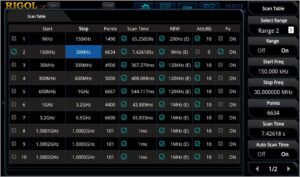
For example, it is possible to use up to 10,000 measurement points per area. The basic settings of measurement points refer to a frequency resolution of RBW/2. For a higher resolution, different ranges can be combined for one test. With a combination of e.g. 3 ranges it is possible to use 30.000 measurement points over the whole frequency to reach expected resolution if necessary. The integrated pre-amplifier (option) and internal attenuator (0 to 50 dB) can be varied per range as well. With combination of different ranges it is possible to increase the dynamic range of the complete measurement without interrupting the measurement itself, because the dynamic range can be adjusted for each single range. The disadvantage of frequency resolution and dynamic range in an SA can be compensated in EMI mode. Additionally to the standard 3 dB RBW filter, the EMI solution contents also the integrated 6 dB filters (200 Hz, 9 kHz, 120 kHz and 1 MHz). Especially RSA5000N providing real time and vector signal analysis capabilities, which is not the case with a TR.
Integration of Limits According to Standards
After the desired frequency range has been selected, you can load the pre-defined and stored limit lines of the desired standard (e.g. EN55022, Class B, AV or/and QP) and display it on the fully logarithmic trace display. A measuring curve can be assigned to each limit. It is possible to activate a measurement curve with a separate detector setting for each pass/fail limit. Different measuring curves can also be measured at the same time. For each limit line it is possible to activate an additional security margin, which is considered in the Pass/Fail viewing. Especially in the pre-compliance check the result should be at least 5-6 dB below the defined limit line to ensure, that the compliance check will be passed.
Advanced Meter/Additional Detectors/Corrections
Another advanced measurement mode is the measurement meter. It is possible to activate up to 3 meters in parallel. Each of them can be used with different detectors and separate limit values. For example, the peak value detector [peak] can be set for first meter, second meter is set to QP detector and third meter to the new CISPR Average [C-AV] detector. The respective measuring meters can be set to the peak under focus via meter marker. The meters measures continuously. This means, for example, with an elevated peak value, the DUT can be reworked and the influence on this value can be immediately represented. A design improvement is immediately visible. With using three meters in parallel it is possible to see the peak measurement (worst case) but also the repetition pulse rate of this signal over a certain time with QP detector can be displayed. In addition a weighted average detector can be used for pulsed sinus-shaped signals with low repetition rate (C-AV4) which displays the maximum linear average value during the measurement.
The meters can be coupled with a signal which is selected in the signal table. An additional fine-tuning of the meter frequency is not necessary. So each peak in signal table can be selected and measured by marker, as well. Alternatively, the meters could be coupled to a marker. For conducted emission tests additional components are used (e.g. line stabilization network (LISN) transient limiters, external attenuator, etc.). Each of the components has a direct influence of test result over frequency range. Therefore, it is possible to activate different corrections in RSA3000N / RSA5000N EMI mode. During the test, the correction will be respected in the result. Correction values can be stored internal the instrument, as a * .csv file. These can also be generated in the PC and loaded later on into the analyser.Measurement
Different conditions can be set for the measurement. On the one hand, variable traces can be recorded at the same time with one or more detectors. Alternatively, only the worst case situation (peak detector) can be recorded. Afterwards each peak in the signal table will be measured with QP and C-AV detector, as well. It is no longer necessary to perform a whole trace with QP and C-AV (duration can be several hours) because these detectors are only interesting when peaks are visible and the test engineer has the information in some minutes and saves a lot of time during pre-compliance evaluation.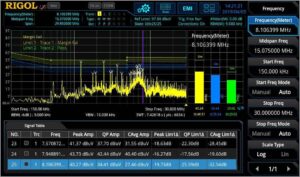
The number of readings in the signal table can be pre-defined. In order to get a detailed view of a peak value, a zoom is available to enlarge a detailed view of a peak. After analysis, the view can be zoomed out to get back the original view.
In case that the full screen of the trace is required, the measurement meter and the signal table can be turned off on the screen.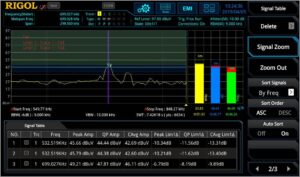
Documentation
In the EMI mode of RSA5000N / RSA3000N series, the measurements can be stored in different ways. For example, the complete signal trace can be stored as a * .csv file or a test report including settings, limits , an image of the graph including meter result and the signal table can be created as HTML or *.pdf in the analyser itself or on an external USB stick. It is possible to modify the header of the test report with information like temperature / humidity, name of operator or test location, etc.
The next part of this document will go through some measurement examples with conducted / radiated emissions and near field probing.
Conducted Emission
As already mentioned, conducted emission is mainly measured up to 30 MHz at lines (e.g. power, analogue / digital signals, etc.). For conducted emission test on power line it is necessary to supply the DUT with power. At the same time the disturbances from DUT shall be measured. The problematic is, that also from the power supply disturbances could be send out which shall not be measured. Another aspect is the impedance matching to avoid a wrong result based on an impedance mismatch. The solution for this problematic is the usage of a line impedance stabilization network [LISN]. A LISN blocks all interferences (via inductive component) from power supply to SA, but supplies a DUT with power. Depending on inductive size, a LISN can be used for DC (5 µH) or AC (50 µH) power source. The power will be blocked on the way to SA (via a capacitance) but the DUT disturbances won’t be blocked and transferred to the SA. The impedance at SA connection is 50 Ω.Two security mechanisms are important using a LISN. When a LISN or a DUT will be activated, then the electric charge of capacitance changing and current flows for a short period. This transient current can destroy the first mixer diode in a spectrum analyser. It is recommended to use a transient limiter between LISN and SA, to protect the analyzer5. For the first test it is also recommended to use an external attenuator for the test to see if high disturbances will be occur from DUT. The attenuator can be removed after first test, when the user be sure, that the disturbance peaks are at a normal level.
In each standard it is defined how the test setup has to be performed. In figure 6 there is the physical connection of a test setup displayed: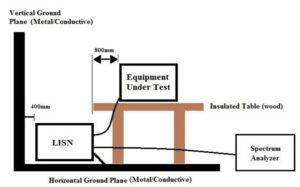
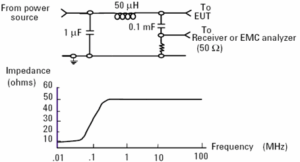
The ground connection of LISN (and DUT if possible) needs to be connected to the horizontal ground plane.
In the example below the conducted emission test was performed on a power supply (Phase) of a test device using a 50µH AC LISN6. First test was performed with integrated LISN limiter and the second test in figure 7 was performed without limiter. The limit lines and detectors are selected for standard EN55022, Class B. The test result is including correction values of LISN. This test uses two limit lines. First one is for average detector and second (blue) limit line is for QP detector. For information only, the peak detector was also activated for final measurement, because the peak detector displays always the worst case value. This power supply is very close below the limit margin, but it passed. Higher peaks can be analysed via measure meter.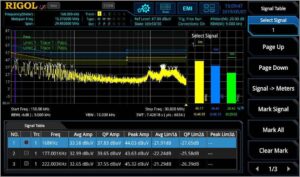
Additionally to EMI analysis the frequency band can be analysed in real time [RT] as well. This mode uses a very fast FFT algorithm to calculate the frequency spectrum. The calculation time is smaller than one FFT frame. Therefore a seamless capture of time signal is possible and no signal information7 will be lost. In RT mode different displays can be used. For example within density mode it is possible, to see a signal repetition over test time in different colour grades and therefore it’s possible to see more details. Density or Normal view could be combined with spectrogram (time waterfall over frequency range) where different amplitude values are displayed in diverse colour grades (see figure 8).
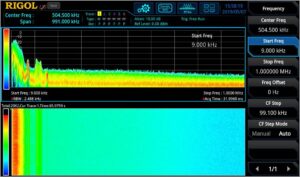
An additional strong tool is the combination of frequency view and power vs time (with bandwidth up to 40 MHz8) in parallel. For a SA it is only possible to view the frequency spectrum or zero span with the max bandwidth of used RBW but not both in parallel. In figure 9 the same DUT was tested with smaller frequency range and with normal spectrum in combination of spectrogram. For this measurement it’s possible to speed up test time to 100 µsec. The interference pulses are now visible in spectrogram. With a Z marker it is possible to measure the difference in frequency, amplitude and time of an interference signal.
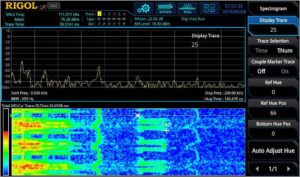
Near Field Probing
Near field analysis is a very important part in pre-compliance analysis and root cause debugging. RIGOL offers with the set of near fields (NFP-3) 4 different H probes for failure detection (see figure 10). It is a special form of emission analysis, because the measurement is done in reactive nearfield range (up to 0.159 * λ)9. In near field magnetic and / or electric field needs to be measured separately because both have a phase shift of up to 90° and nearfield stores blind energy without radiation. For most radiated emission root causes can be detected with locating the near field strength.
Tests on housing leakage could be detected as well as strong disturbance components like ribbon cables or LCD panels. Bigger probes are usable to find the area of interferences. Smaller probes can be used to detect the exact source.
One approach for near field analysis is to use the spectrum analyser with linear frequency scale / no limit lines and test e.g. a frequency range of 30 MHz to 500 MHz with a RBW of 100 kHz and activation of pre-amplifier (internal attenuator: 0 dB) to get a first view the interference peaks of DUT (see figure 11).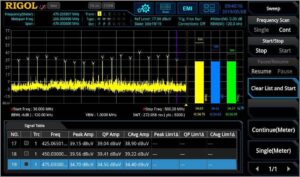
Radiated Emission
According to the description at the beginning, propagation starts when λ is small to the geometry and E & H are no longer independent. Both are in-phase and propagate to the environment. Radiated emission is not easy to test. In a test laboratory a big hermetic test chamber is used where far field conditions are fulfilled and other influences (due to external components like a mobile phone, etc.) are not visible in the result. Far field condition starts with a distance of 4 * λ and the characteristic wave impedance is 120 * π Ω (= 377 Ω). The hermetic room has in most cases at the wall broadband absorber for impedance matching of EM wave to avoid reflections. The altitude of broad band antenna can be changed during a test to find the highest peak at DUT during the test10.In most cases such kind of test chamber is not available for pre-compliance analysis. Therefore alternative ways has to be evaluated.
First of all, it is possible perform a free field measurement with the distance of radiated near field which is defined for 0.159 * λ to 4 * λ. In this region a far field evaluation is possible (with using correction values). To detect the test area attenuation11 from environment it is possible to perform a test with a counter antenna instead of DUT and the results will be compared with defined formula of theoretical value. The difference is the test area attenuation. Depending on the distance between antennas, variable correction factors are used. This test needs a very good conductive ellipsis area12. There shall be no conductive obstacles greater than 5 cm within the ellipsis (see figure 12). DUT and test antenna are located within the focus of ellipsis. It is necessary to perform an altitude variation of test antenna to detect maximum.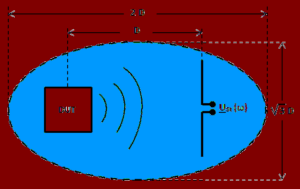
This test is very time intensive and expensive. A more simple way of radiated emission analysis for pre-compliance test is, to use a TEM cell.
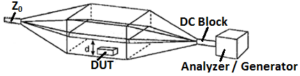
A characteristic for radiation of antennas is the far field. According to the description above, the characteristic wave impedance ZF = E / H which is in far field, is 377 Ω. The idea of a TEM13 cell is the medium of a coax cable which is suitable for a TEM wave propagation. The characteristic wave impedance in a coax cable is independent of the mechanical structure and always 377 Ω. A TEM cell is displayed in figure 1314. A common use for pre-compliance analysis is, to use an open TEM cell with disadvantage to see influence from environment. But this could be evaluated as a reference measurement with deactivated DUT. The two bends on the roof are necessary for the matching, but results into a frequency limit (max frequency range) is the cut off frequency based on the generation of higher wave guide modes on these bends which have an influence on test results. This cell can be used for susceptibility stress of a DUT but can also be used for repeatable pre-compliance radiated emission approximations which are sufficient for pre-compliance analysis. The connection to a spectrum analyser needs a DC blocker because the lowest cut off frequency of a coaxial cable is 0 Hz (= DC) which could destroy a spectrum analyser. For impedance matching of septum15 it is necessary to use a 50 Ω Termination on second port to avoid reflections. The DUT is placed between septum and lower shielding plate. A test setup is visible in figure 14. The advantage of open TEM cells, failures can also be analysed in parallel with a near field probe to detect the root cause area of DUT.
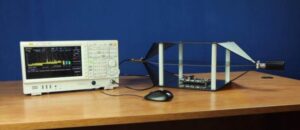
Susceptibility Analysis
Near field probes, current probes and TEM cells can also be used for conducted / radiated susceptibility stress of a DUT. RIGOL’s RF generator series DSG800 or DSG3000B are an optimal tool in combination with those components, to stress a DUT with an amplitude modulation [AM] e.g. according to IEC 61000-4-316, A functionality during stress might be controlled via the oscilloscope MSO8000 to see e.g. influence to jitter of clock signals or wrong decoding of bus systems or to see crosstalk effects on strip lines. Conducted susceptibility could be done with a current probe over the related stress cable. Also the real time spectrum analyser can be used to measure, in parallel, sporadic interference reaction at DUT due to susceptibility stress. The real time functionality offers different trigger types. One is the frequency mask trigger [FMT] which is a defined field (different colour) and the RTSA measures only, when the conditions of the field is fulfilled (e.g. measure, when a signal is inside the FMT field, see figure 15).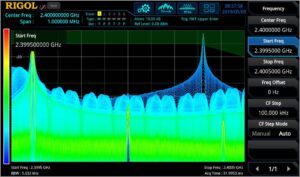
The quality of digital modulation of RF interface during absorption stress can be tested via RSA5000N VSA (see figure 16). Here it is possible to display also I and Q stream separately to see which part of transmitter is affected by the interference. Additionally a BER test could be performed during stress situation.
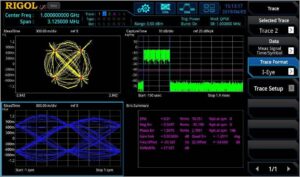
Additionally, with the vector network analyser function [VNA] it is possible to measure out related antennas or other components to see if a possible degradation of performance is visible (see figure 17).
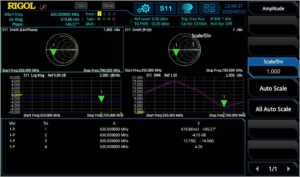
Summary
RIGOL offers a new dimension of pre-compliance testing with the new EMC solution for the series RSA3000N/RSA5000N. With the additional meter measurement method high peak values can be determined and improved at a very early design stage. This test solution eliminates the need for PC test software. The EMV analysis is also greatly simplified by the pleasant operation of the device (touchscreen or operator panel as well as USB mouse or USB keyboard). In addition, the real-time capacities (real-time is integrated as standard) of the RSA series provide an expanded insight into EMC analysis.
Rigol DM3000 Price Reductions
For a limited time Rigol have reduced the price of the DM3000 Series.
DM3058 was £515.00, now £453.00
DM3058E was £361.00, now £335.00
DM3068 was £633.00, now £544.00
Click HERE to view the DM3000 Series Category Page