Your cart is currently empty!
Author: James

Unable to save CSV data on a DS1000Z series scope
Comma Separated Values can be saved on a USB memory stick by going to the Storage menu and selecting CSV. If you are unable to save the file and see a “Function Limited!” error displayed check that the scope has been triggered.
For example, if the scope trigger mode is set to Normal and the Run/Stop keypad button is green the scope has not triggered and you will see Wait flashing on the upper left of the display. In this condition CSV data cannot be saved and you will see the error.
MSO5000, DS7000 and MSO8000 Alternative Factory Reset and Firmware Upgrade
To reset or upgrading the firmware on the MSO5000, DS7000 and MSO8000 series of oscilloscope without using the instrument’s Utility menu:
1) Power cycle the instrument
2) During the boot sequence, quickly and repeatedly press the Single button in the upper right hand corner of the instrument.MSO5000 series Open Source Acknowledgment
RIGOL’s MSO5000 series product uses a number of open source software packages. This document lists the open source software packages used in MSO5000 series product.
https://beyondmeasure.rigoltech.com/acton/attachment/1579/f-79a90744-6878-4071-b9f1-ab4780ccf05b/1/-/-/-/-/MSO5000.pdf
MSO&DS7000/8000 series Open Source Acknowledgment
RIGOL’s MSO&DS7000/8000 series product uses a number of open source software packages. This document lists the open source software packages used in MSO&DS7000/8000 series product.
https://beyondmeasure.rigoltech.com/acton/attachment/1579/f-232b8974-dafb-4d2e-9487-5d95f5c247a3/1/-/-/-/-/MSO_DS7000%268000.pdfService Action on DS1000Z and MSO1000Z
We have become aware of a manufacturing issue that may impact the usability of your instrument. If you are experiencing problems with your horizontal and vertical adjustment controls you likely need to download and install the latest firmware to address the issue.
First Check your SN Range. If your instrument falls between the following serial number ranges your unit is likely affected and you should load the latest Firmware.
DS1ZA203514550 through DS1ZA204719916
DS1ZB203800381 through DS1ZB204400481
DS1ZC203601463 through DS1ZC204201813
DS1ZD203800906 through DS1ZD204401180
If your unit falls in these serial number ranges you should likely load the new firmware. You should check your current instrument software level by selecting:
Utility => System => System Info
If you are at 00.04.04.SP4 you are at the latest level and should take no additional action. That will look like this:
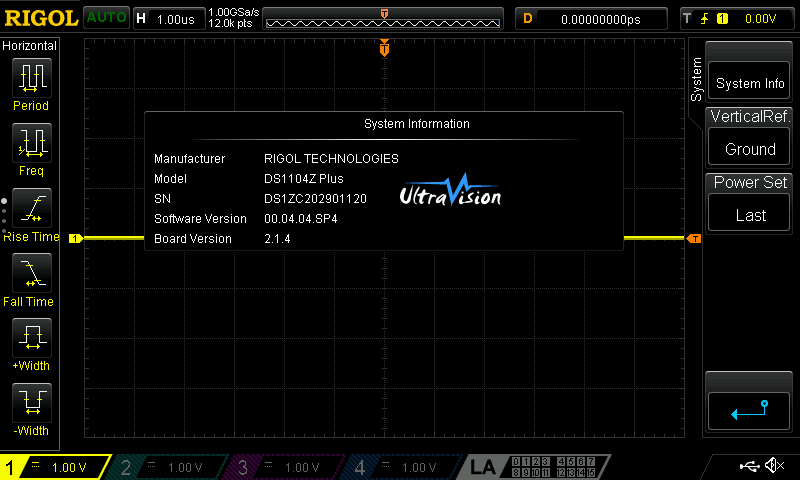
If your instrument is at anything lower than 00.04.04.SP4 you should download the new firmware by following the attached link and install at your convenience.Review the Upgrade Instructions
Review the Release NotesIf you have any questions or concerns or concerns about this update feel free to contact our technical support team at 877-474-4651 (select option #2) or email us at help@rigol.com.
If you are not the end user of the equipment please forward to the appropriate person in your organization.
Thanks so much for choosing RIGOL. We apologize for any inconvenience this action will cause you.
Maximize the measurement accuracy of the DS1000Z
To maximize the DS1000Z series measurement accuracy you need to increase the instrument’s memory depth to be over 1 Mpts and then put the instrument into High Res mode.
To do this press “Acquire” then change the “Mode” to High Res and then change the Memory depth to be above 1 Mpts.
MSO8000 Advanced Jitter Analysis Capability
Visualise and debug precise timing characteristics in serial data signals. Combine jitter readings with Time Interval Error trend and TIE histogram. The high sample rate and deep memory combine to analyse subtle timing effects of complex signals.
MSO8000 Performance Bandwidth and Risetime Measurements
The MSO8000 Series oscilloscopes have up to 2 GHz bandwidth. High performance risetime and 10 GSa/sec max sampling enables the MSO8000 to precisely analyze signal quality and timing.
MSO8000 Real-Time Eye Analysis Capability
Complete signal quality analysis for serial data transmissions. Eye Diagram Analysis makes it easy to debug subtle timing, noise, and rise-time issues on serial data signals. Combine with Histogram analysis of edge transitions for visualizing and characterizing embedded transmissions.
Perform a Self-Cal on a DS1000Z
To perform a Self -Cal on the DS1000Z first disconnect all of the probes from the instrument. Then press “Utility” -> arrow down -> “Self-Cal” -> “Start”.
DS1202Z-E Unable to Connect to UltraScope
If you receive the following error when connecting the DS1202Z-E to Ultra Scope that is because the oscilloscope is newer then the UltraSigma release.
To solve this issue a change needs to be made to the init file to support this model. In the image below you can see the default location of the init file and the edit I made is highlighted. Linked below is also a copy of the init file. You can also just replace your copy with the version linked to below. After that close and restart UltraSigma and then the software will operate correctly.

Probe Compensation
In Order to insure system signal fidelity it is critical that probes be compensated to the instrument, Over or under compensated probes can cause distortions of your measurements and bad results.