Your cart is currently empty!
Author: James

Siglent SDS5000X Bandwidth Upgrade Offer
Free Bandwidth Upgrade (Value from £1,845.00)
Purchase any SDS5000X Series Oscilloscope and receive a free bandwidth upgrade to the next highest bandwidth model
Offer Valid Until 30-9-2021To see the SDS5000X Category Page please see HERE

Siglent release NEW SNA5000A Vector Network Analyser
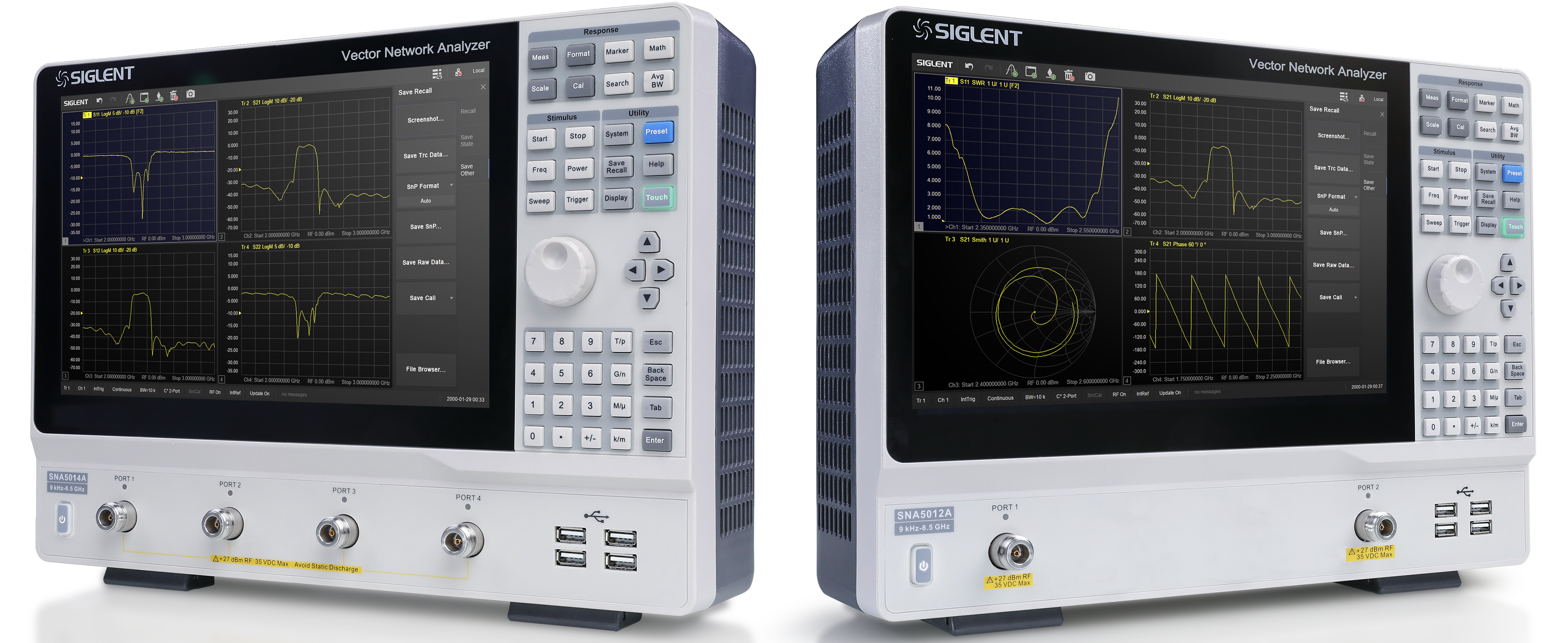 SIGLENT presents its first vector network analyser and the first device of its new “A” performance line
With the continuous growth of radio and cellular networks, the increase in data traffic and increasing data rates, the need for high-performance measurement technology is growing. Vector network analysers are a key measuring device in the field of high frequency technology. Measurement of passive or active components, verification of 2-port networks or adaptation of antennas are just a few examples of where VNAs are required. The intuitive operating concept of the SNA5000A makes work easier and faster, and the large screen enables the results to be displayed clearly. The powerful hardware ensures accurate and reliable results.July 20, 2021: SIGLENT Technologies presents its first 2- or 4-port vector network analyser. This innovation is an important and significant step for Siglent as the SNA increases Siglent’s product breadth and is the first family of products introduced in the new “A-Line”. This is expressed by the new suffix “A” at the end of each model number. Several more A-series devices will follow in the next 18 months. Compared to the existing, very successful X-series devices, which focus on price-performance, the A-line focuses on quality, reliability and efficiency.
The SNA5000A network analyser is offered as a 2- or 4-port device with frequency ranges from 9 kHz to 4.5 GHz or to 8.5 GHz. The dynamic range spans 125 dB and enables, for example, a precise analysis of the stopband of a filter without losing sight of the passband. The analysers support 2/4 port S-parameters and differential S-parameter measurements. Time domain analyses can be performed with the options SNA5000-TDA (Time Domain Analysis) or SNA5000-TDR (Advanced Time Domain Analysis).
The accuracy of a network analyser is very much linked to the accuracy of the calibration. Different calibration techniques are required for different applications. With the SNA5000A, the user can choose between 1-port, extended 1-port, full 2-port correction and the different techniques SOLT, SOLR, TRL in order to obtain the best accuracy for the respective application. An adjustable reference plane, port matching and the embedding / de-embedding of test sockets enable the elimination of external sources of error. The VNAs of the SNA5000A series offer five types of sweeps: linear and logarithmic frequency sweeps, output power sweeps, time domain sweeps and segmented sweeps. The formula editor and the mask test support the developer in the analysis of his test object and accelerate the evaluation and verification.
The large 12-inch touchscreen can be flexibly configured so that several windows with different measurements can be clearly displayed. The short-cut menu helps with configuration and offers quick access to the most important functions. The device supports an external mouse and keyboard, external monitor via HDMI, and can be controlled via the web interface from the PC.
To view the SNA5000A Category page, please see HERE

Siglent SPS5000X Special Launch Price!
Following the launch of Siglent’s new SPS5000X Series DC Power Supplies, all prices have a special 10% discount until the 30/09/2021.
DC Electronic Load – Part 4: How Each Operation Mode Works with Other Modes?
We have so far explained the four major operation modes for electronic loads – 1) constant current 2) constant resistance 3) constant voltage and 4) constant power, in the previous white papers. Now this paper describes how these modes relate to each other and how each mode works on other modes.
4-1. Relationship between Operation Modes
Figure 4-1 shows the block diagram for the control circuit structure of the electronic loads, where each operation mode is switched by.
The CC-CR switch closes either path of the constant current (CC) circuit or the constant resistance (CR) circuit. There is the OR circuit connected between the closed circuit (either CC or CR), the constant power (CP) circuit and constant voltage (CV) circuit. You will have the following three factors to determine which circuit is used, CP circuit or CV circuit: 1) the setting value for each control circuit 2) the input voltage of the electronic load and 3) the input current of the electronic load. In addition, the setting of the CV-ON switch determines whether to use the CV circuit or not.
Therefore, the electronic load users need to set at least the following settings:
1) Choose the CC mode or the CR mode to be used.
2) Choose whether to use the CV mode or not.
3) Set the appropriate settings for each operation mode.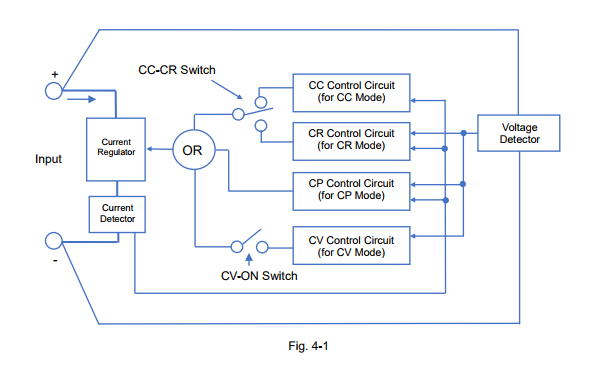
As stated above, the four operation modes have the relationship with each other and the modes are switched depending on the setting values, the input voltage and the input current of the electronic load. In the next sections, we are going to explain the details how each mode is related and when exactly the modes are switched.
4-2. How CC Mode is Combined with Other Mode
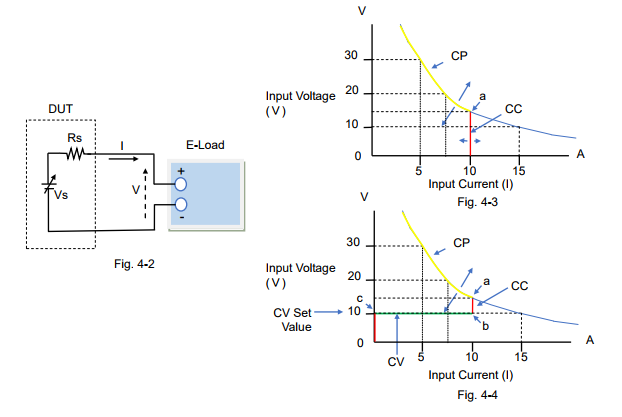
Figure 4-2 describes the circuit of the DUT and the electronic load; the components of the DUT are the voltage source (Vs) such as a power supply and the resistance (Rs) connected in series with Vs.
Figure 4-3 and 4-4 are the characteristic examples of how the input current flows with the Vs change when the CC mode setting of the electronic load is set to 10 A.
For figure 4-3, the CV mode is turned off. While Vs rises from almost 0 V to Point ‘a’, the electronic load operates in CC mode at 10 A as shown in the red line. After Vs exceeds Point ‘a’, the electronic load operates in CP mode*1 at 150 W as shown in the yellow line.
For figure 4-4, the CV mode is turned on (CV-ON). If Vs rises from almost 0 V, the input current does not actually exist until Point ‘c’ (= at the CV set value). After Vs exceeds Point ‘c’, the electronic load operates in CV mode until Point ‘b’, but it operates in CC mode after Point ‘b’ to Point ‘a’ at 10 A. After Vs exceeds Point ‘a’, the electronic load operates in CP mode*1 at 150 W as shown in the yellow line.
*1: Some electronic loads provide the overpower protection (OPP) function instead of the CP mode. The protection function will be described later in another white paper in this series.
Recommendations and Precautions for Use of CC Mode
To ensure the reliability of the CC mode operation, read the following advice:
1) If you want to use the CC mode only, you just set the CC mode setting. Turning off the CV mode is recommended, because if the CV mode is turned on (CV-ON), the input current does not actually exist until the input voltage reaches the CV set value. When setting the CP mode value or the OPP value, set it to the maximum.
2) The CV mode (CV-ON) can be used as the over-discharge protection for rechargeable batteries. Initially the CC mode starts to discharge the battery until the battery voltage falls to the CV set value. Then, the mode switches from CC to CV and the electronic load stops the input current flow. This prevents the battery voltage from becoming too low to protect against over discharge.
3) When entering the CC mode, some electronic loads may automatically set the CP mode value to the maximum.
4-3. How CR Mode is Combined with Other ModeFor the system circuit, see figure 4-2 above.
Figure 4-5 and 4-6 are the characteristic examples of how the input current flows with the Vs change when the CR mode setting of the electronic load was set to 1.5 Ω.
For figure 4-5, the CV mode is turned off. While Vs rises from almost 0 V to Point ‘a’, the electronic load operates in CR mode at 1.5 Ω as shown in the red line. After Vs exceeds Point ‘a’, the electronic load operates in CP mode*2 at 150 W as shown in the yellow line.
For figure 4-6, the CV mode is turned on (CV-ON). If Vs rises from almost 0 V, the input current does not actually exist until Point ‘c’ (= at the CV set value). After Vs exceeds Point ‘c’, the electronic load operates in CV mode until Point ‘b’, but it operates in CR mode after Point ‘b’ to Point ‘a’ at 1.5 Ω. After Vs exceeds Point ‘a’, the electronic load operates in CP mode*2 at 150 W as shown in the yellow line.
*2: Some electronic loads provide the overpower protection (OPP) function instead of the CP mode. The protection function will be described later in another white paper in this series.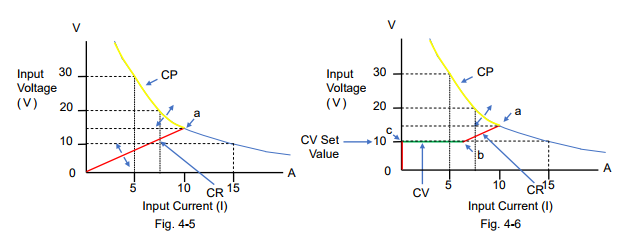
Recommendations and Precautions for Use of CR Mode
To ensure the reliability of the CR mode operation, read the following advice:
1) If you want to use the CR mode only, you just set the CR mode setting. Turning off the CV mode is recommended, as stated above in ‘Recommendations and Precautions’ of Section 4-2. When setting the CP mode value or the OPP value, set it to the maximum.
2) The CV mode (CV-ON) can be used as the over-discharge protection for rechargeable batteries. For this CV mode operation, refer to ‘Recommendations and Precautions’ of Section 4-2. *Read as changing the CC mode to the CR mode.
3) When entering the CR mode, some electronic loads may automatically set the CP mode value to the maximum.4-4. How CP Mode is Combined with Other Mode For the system circuit, see figure 4-2 above.
Figure 4-7 and 4-8 are the characteristic examples of how the input current flows with the Vs change when the CP mode setting of the electronic load was set to 100 W.
For figure 4-7; the CV mode is turned off, and the CC mode or the CR mode is set to Automatic or the maximum rating value. If Vs rises from almost 0 V to Point ‘a’, the electronic load operates in CC mode at 15 A (rating current) as shown in the red line. After Vs exceeds Point ‘a’, the electronic load operates in CP mode at 100 W as shown in the yellow line and it may reach Point ‘c’ with Vs change.
For figure 4-8, the CV mode is turned on (CV-ON). While Vs rises from almost 0 V, the input current does not actually exist until Point ‘a’ (= at the CV set value). After Vs exceeds Point ‘a’, the electronic load operates in CV mode until Point ‘b’. After Vs exceeds Point ‘b’, the electronic load operates in CP mode at 100 W as shown in the yellow line and it may reach Point ‘c’ with Vs change.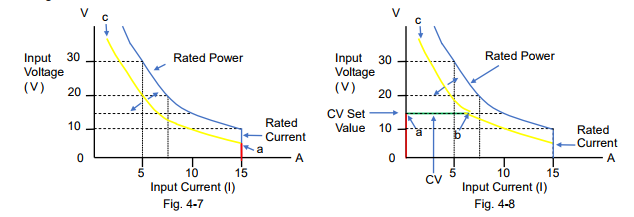
Recommendations and Precautions for Use of CP Mode
To ensure the reliability of the CP mode operation, read the following advice:
1) When setting the CP mode value and the CR mode value, set them to the maximum.
2) If you want to use the CP mode only, you just set the CP mode setting. Turning off the CV mode is recommended, as stated above in ‘Recommendations and Precautions’ of Section 4-2.
3) The CV mode (CV-ON) can be used as the over-discharge protection for rechargeable batteries. For this CV mode operation, refer to ‘Recommendations and Precautions’ of Section 4-2. *Read as changing the CC mode to the CP mode.
4) In CP mode, if you do not want a high input current, you can regulate it by setting a lower CC mode value or setting an overcurrent protection (OCP).
4-5. How CV Mode is Combined with Other Mode For the system circuit, see figure 4-2 above.
Figure 4-9, 4-10 and 4-11 are the characteristic examples of how the input current flows with the Vs change when the CV mode setting of the electronic load was set to 10 V.
Figure 4-9 shows the combination between the CV mode and the CC mode. For the CV mode operation, read Section 4-2 describing figure 4-4 ‘the CV mode is turned on (CV-ON)’. The input current does not actually exist until Vs reaches the CV set value. After Vs exceeds Point ‘c’, the electronic load operates in CV mode until Point ‘b’ as shown in the green line. Then, after Vs exceeds Point ‘b’, the mode switches to the CC mode until Point ‘a’. If Vs rises above Point ‘a’, the mode switches to the CP mode*4.
Figure 4-10 shows the combination between the CV mode and the CR mode. For the CV mode operation, read Section 4-3 describing figure 4-6 ‘the CV mode is turned on (CV-ON)’. Figure 4-10 looks similar to figure 4-9, except that the mode is in the CR mode from Point ‘b’ to Point ‘a’. Figure 4-11 shows the combination between the CV mode and the CP mode. For the CV mode operation, read Section 4-4 describing figure 4-8 ‘the CV mode is turned on (CV-ON)’. While Vs is lower than Point ‘a’ (= at the CV set value), the input current does not actually exist. When Vs exceeds Point ‘a’, the electronic load operates in CV mode until Point ‘b’ as shown in the green
line. After Vs exceeds Point ‘b’, the electronic load operates in CP mode.
*3: ‘CV-ON’ can be referred to as ‘+CV’.
*4: Some electronic loads provide the overpower protection (OPP) function instead of the CP
mode. The protection function will be described later in another white paper in this series.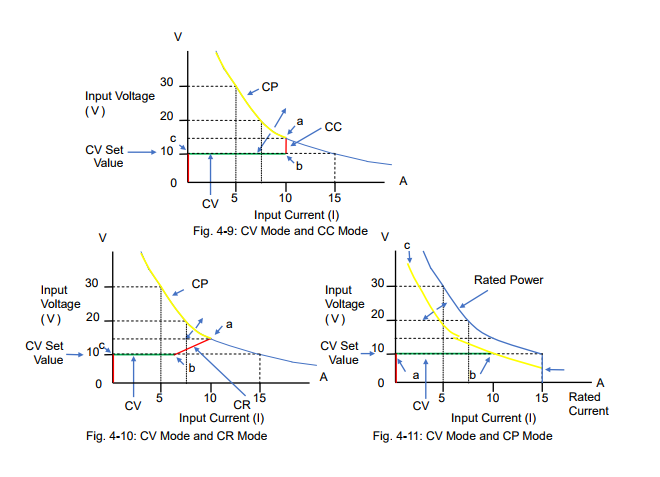
Products Mentioned In This Article:
Kikusui Electronic Loads please see HERE
How to Double Output Voltage from Two PBZ through BTL* Connection
Here is an introduction on a method to achieve a double output voltage using two units of PBZ. The actual connection of PBZs is shown in Figure 1 as;
-‘OUT’ terminals are used for output.
– Only ‘COM’ terminal can be earthed for output, if required.
For the frequency characteristics, it is limited to 50 kHz in CV (100 kHz in normal) and limited to 8 kHz in CC (10 kHz in normal) as specification. This method enables you to use PBZ as high-speed bipolar power supply for your usage and needs.
*BTL (Bridged Transformer Less)
1. Connection Overview:
PBZ BTL Master (BTL Master) outputs the positive voltage (+V), while PBZ BTL Slave (BTL Slave) outputs the negative voltage (-V) through ‘OUT’ terminal. So, the amount of output voltage on the RL will double (2V).
How to Connect PBZ:
1) Connect ‘COM’ terminals to each other.
2) Connect each ‘OUT’ terminal to RL.
3) Make sure that rear ‘OUT’ terminal is not connected to ‘GND’ terminal. You can connect rear ‘COM’ terminal to ‘GND’ terminal, if needed.
4) Connect ‘CV MONITOR (pin 13, 18)’ of J1 Connector on BTL Master (rear side) to ‘EXT SIG IN’ on BTL Slave (front side).
5) Connect ‘TRIG OUT’ on BTL Master (rear side) to ‘TRIG IN’ on BTL Slave (rear side) to build trigger synchronization.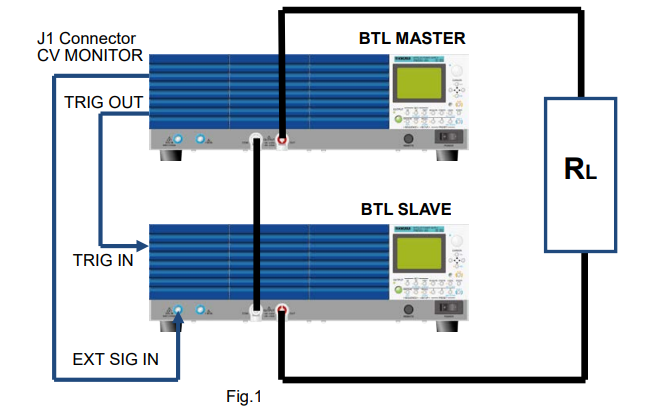
2. Settings
After connecting as shown in Figure 1, please make the settings below.
Note) It is recommended that you return BTL Master/Slave to the factory default prior to the settings;
– Switch POWER on while holding down SHIFT key to return to the factory default.2-1 Settings for BTL Master
To synchronize the OUTPUT ON/OFF operation between BTL Master and Slave, set CONFIG [3] (3/7) > SYNCHRONOUS > OPERATION as below (Refer to page 89 of user’s manual):
(1) Press CONFIG key several times to move to the menu 3/7.
(2) Specify SYNCHRONOUS > OPERATION > MASTER using the knob.
(3) The setting is confirmed once ‘MASTER’ is displayed.
2-2 Settings for BTL Slave
1) To synchronize the OUTPUT ON/OFF operation between BTL Master and Slave, set CONFIG [3] (3/7) > SYNCHRONOUS > OPERATION as below (Refer to page 89 of user’s manual):
(1) Press CONFIG key several times to move to the menu 3/7.
(2) Specify SYNCHRONOUS > OPERATION > SLAVE using the knob.
(3) The setting is confirmed once ‘SLAVE’ is displayed.
2) BTL Slave is synchronized with BTL Master and uses ‘CV MONITOR’ as an external signal source via ‘EXT SIG IN’ instead of using its internal signal.
Set CONFIG [2] (2/7) > SIGNAL SOURCE > SELECT as below (Refer to page 88 of user’s manual):
(1) Press CONFIG several times to move to the menu 2/7.
(2) Specify SIGNAL SOURCE > SELECT > EXT using the knob.
(3) Specify SIGNAL SOURCE > EXT SELECT > BNC using the knob.
(4) The setting is confirmed once (2) and (3) is specified.
3) Set the external signal circuit gain and output polarity to produce the negative output (-V). Specify CONFIG [2] (2/7) > SIGNAL SOURCE > EXT GAIN as below (Refer to page 88 of user’s manual):
(1) Press CONFIG several times to move to the menu 2/7.
(2) Specify SIGNAL SOURCE > EXT GAIN as:
PBZ20: -10.0
PBZ40: -20.0
PBZ60: -30.0
PBZ80: -40.0
The polarity will be inverted by specifying the negative output value.
(3) The setting is confirmed once (2) and (3) is specified.
(4) Perform the gain adjustment to exactly match the output between BTL Master and BTL Slave in step 2.3. How to Operate
・ Turn OUTPUT on/off by BTL Master only.
・ Specify the CV/CC value and current limit value by BTL Master only. ・ If used the same rated voltage models, the output voltage will double. ・ Set RESPONSE of BTL Slave to the fastest.
・ Apply the connection control to BTL Master, if needed.
4. Output Results
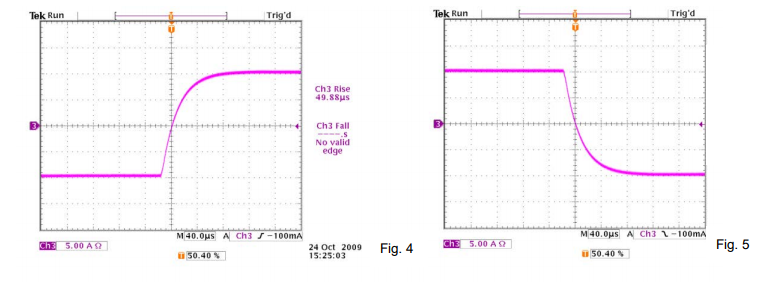
4-1 CV Output – Rising/Falling CharacteristicsPBZ40-10 x 2
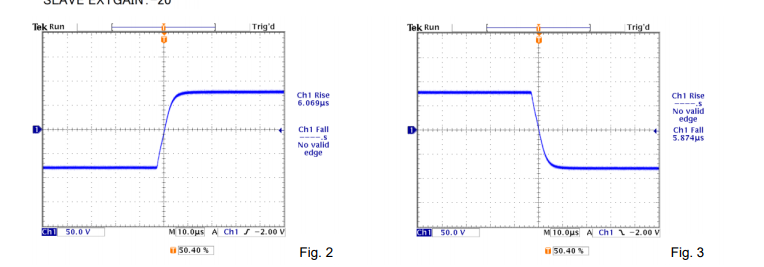
4-2 CC Output – Rising/Falling Characteristics
PBZ40-10 x 2
5. Precaution in Use and Others
5-1 Connecting with Different Rated Models
It is available to connect PBZs with the same rated voltage and different rated voltage. When connecting PBZs with different rated voltage, the output voltage of BTL Slave is specified by the same ratio of those of BTL Master. In fact, the total output voltage will not double.
E.g.) BTL Master: PBZ40, BTL Slave: PBZ20; If the output voltage from PBZ40 is set to 20V, the output voltage from PBZ20 will be 10V and the total applied voltage on the load will be 30V.
5-2 Precaution in Measurement
Please use a differential probe when measuring the output voltage with an oscilloscope. Without a differential probe, the output will be shorted at the oscilloscope probe, and it may be burnt out.
5-3 How to Achieve CV 100KHz
As shown in Figure 6, please use PBZs as BTL amplifier.
Connect a function generator (FG) through ‘EXT SIG IN’ terminals. FG is used as an external signal source to reach your desired output voltage. By using FG, GAIN is set to be negative to invert BTL Slave polarity. To synchronize the OUTPUT ON/OFF operation between BTL Master and Slave, please build trigger synchronization.
With this method, only ‘COM’ terminals can be grounded.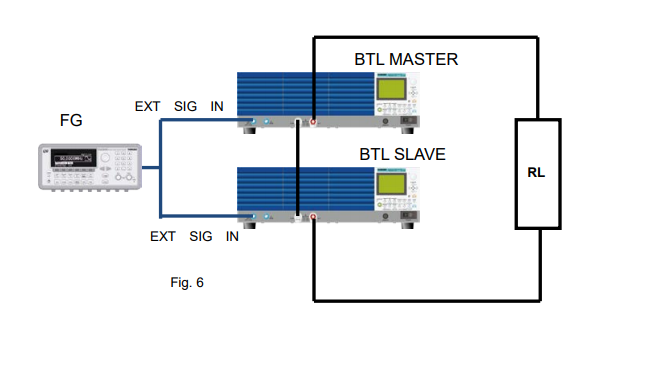
Products Mentioned In This Article:
- PBZ Series please see HERE
Useful Functions and Precautions for Using L-Load/C-Load in PCR-LE Series
1. When Using Inductive Load (L-Load)
1-1 Soft Start
A typical L-load is a motor load. E.g.) If using an induction motor load, the startup current can be 5 times (or more) larger than the normal startup current and it flows for several hundred ms.
In this situation; 1) The motor load becomes inductive. 2) The power factor is approx. 0.5 at peak current.
PCR-LE Series features the Soft Start function to gradually increase the startup voltage when OUTPUT is turned on. If Soft Start is set to ON in the above situation; 1) The startup current (peak current) decreases. 2) The power factor is approx. 0.65 at peak current. 3) The startup voltage gradually rises for up to 3 seconds.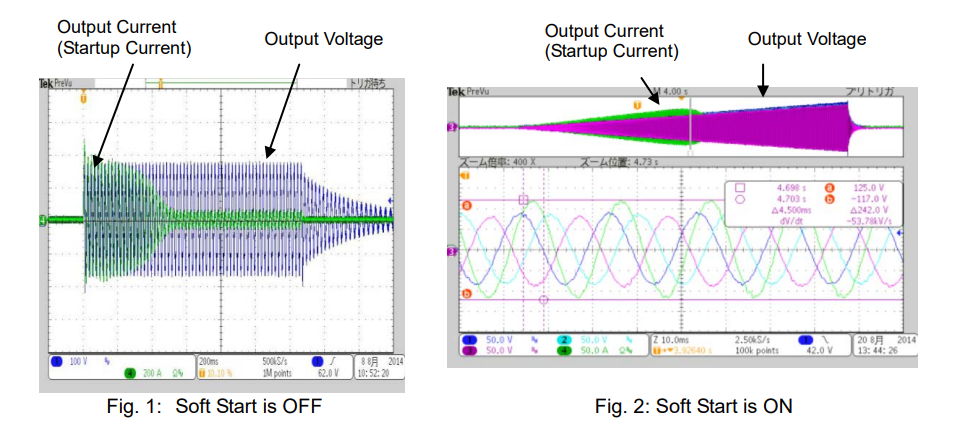
1-2 Output Capacity Reduction Due To Power Factor
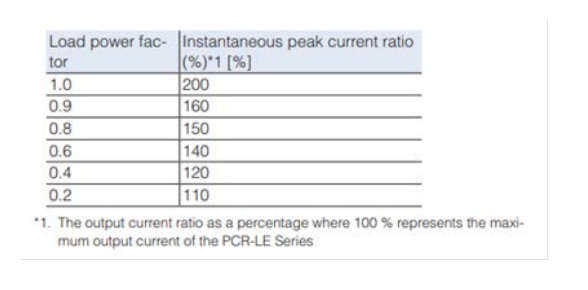
As described in the above, the power factor decreases and the higher current flows for several hundred ms with the motor load. Since this period is quite short, it can be considered as the instantaneous peak current. The instantaneous peak current ratio decreases due to the power factor (see the table below).
2. When Using Capacitive Load (C-Load)
2-1 Soft Start
PCR-LE Series supports the DC output mode. In DC mode, the peak current in C-load changes with the voltage rise slope and can be calculated as: I=LdV/dt. Since the voltage rise time of PCR-LE Series is from 15μs to 70μs, the high peak current may flow depending on the capacitor size. To prevent it, turn Soft Start on to decrease the peak current.
2-2 Surge Suppression Function
Generally, if the output is suddenly interrupted, the L-load releases energy. It means that;
1) It becomes the high impedance state due to the sudden interruption. 2) The L-load generates the surge voltage and it is biased to the power supply as overvoltage.
To prevent it, PCR-LE Series features the Surge Suppression function. When OUTPUT is turned off while Surge Suppression is set to ON (factory default setting), the output voltage stays at 0V for approx. 200μs and then the output impedance becomes high.
For C-load or capacitive DUT:
Surge Suppression is ON: If OUTPUT is turned off in DC mode, the output voltage rapidly falls (see Fig. 3) and the current flows from DUT to PCR-LE Series.
Surge Suppression is OFF: See Fig.4. This is equivalent to having the interruption due to wiring disconnection. It may meet the requirements of IEC6100-4-29 (interruption in high impedance state).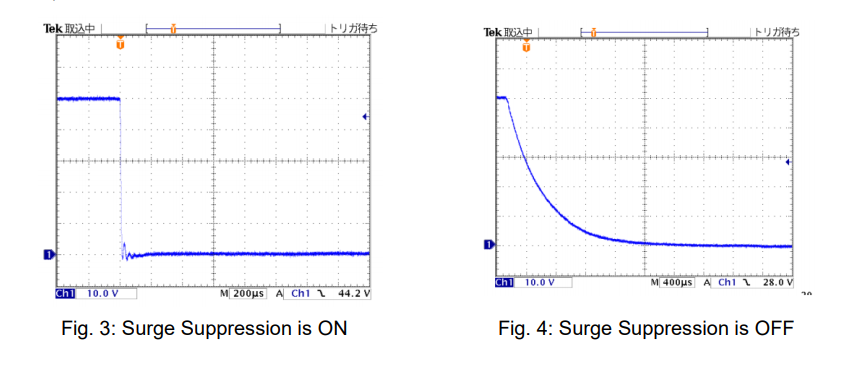
2-3 Response Speed
PCR-LE Series uses a high-speed linear amplifier to provide high-quality/high-stability output. It can freely control the broadband waveform; however the output may become unstable depending on the capacitive load capacity or wiring conditions. To improve it, you can set the response speed of the internal amplifier to SLOW.
Response speed mode for PCR-LE Series:
Rated power capacity is 4kVA or less: FAST, MEDIUM, SLOW Rated power capacity is 6kVA or more: MEDIUM, SLOWProducts Mentioned In This Article:
PCR-LE Series please see HERE
Which Power Supply is Most Suitable to Run DC Motor?
When choosing a power supply to run a DC motor, the first and most important thing you need to consider is a maximum current that your motor will use. DC motor typically requires a startup current which is quite a lot higher than its running current. Due to this, not all DC power supplies can provide sufficient power to DC motors.
In this white paper, we will take a look at the capability of our bipolar DC power supply PBZ20-20A, which can supply a short-term peak current up to six times its rating current (± 120 Apk CV).
Below, we are going to share our measurement results that show how PBZ20-20A worked with a DC motor.
1. Purpose of Measurement
The purpose of this measurement is to determine the performance of PBZ20-20A on a brushed DC motor by measuring the voltage and current waveforms.
2. Wiring Connection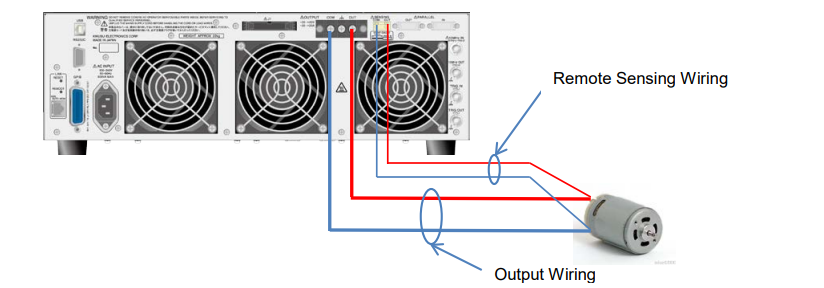
▪ Each was crimped: the positive ends and negative ends of output and remote sensing wires. ▪ Wiring length: Approx. 1 m for both remote sensing and output wiring
▪ Wiring cross section: Output wiring: AWG16 1.31 mm² (1.25 sq),
Remote sensing wiring:AWG24 0.205 mm² (0.2 sq)
▪ The twisted pair was made on the output and remote sensing wire. 3. Measurement Conditions
▪ Output mode: CV mode
▪ Response setting: CV mode voltage response: 3.5 μs/100 μs, CC mode current response: 35 μs/1 ms * PBZ20-20A can output a peak current only when the current response is set to 1 microsecond in CV
mode.
▪ Limit setting: Voltage limit: + 14 V (protect the motor from overvoltage),
Current limit: ± 22 A (output current setting: max.)
▪ Voltage setting: 12 Vdc
▪ Motor to be used: Brushed DC motor – details unknown.4. Results
1) Response setting: CV 3.5 μs, CC 35 μs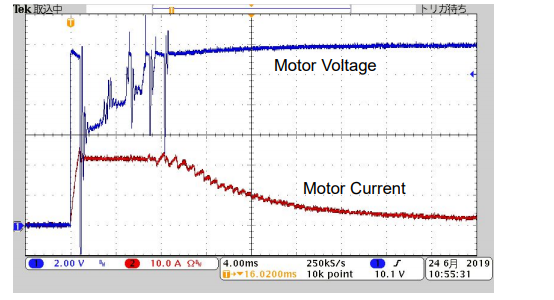
▪ The motor voltage was oscillated because the output current was limited (no peak current was provided).
2) Response setting: CV 100 μs, CC 1ms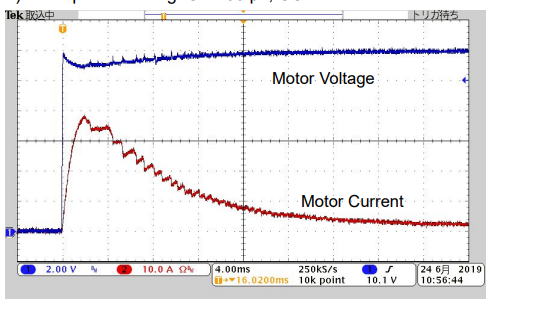
▪ CV mode voltage response setting was changed: 3.5 μs to 100 μs. ▪ CC mode current response setting was changed: 35 μs to 1 ms.
▪ Since the current response was set to 1 microsecond, PBZ20-20A could output the peak current. ▪ The voltage oscillation was reduced.
3) Response setting: CV 100 μs, CC 1ms with remote sensing turned on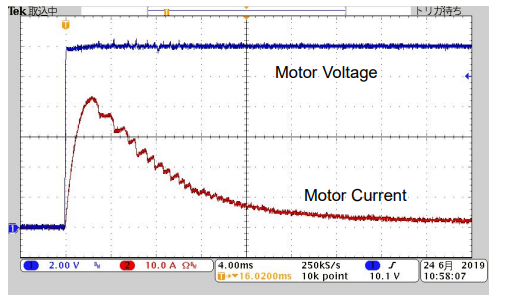
▪ With the remote sensing turned on, the voltage became more stable.
4) When the output was turned off:
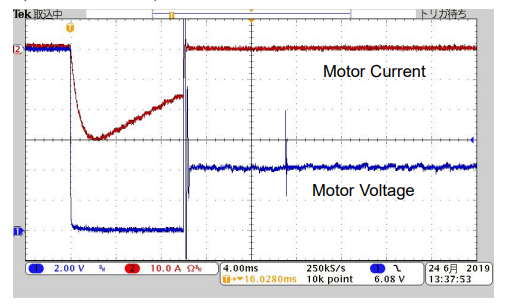
▪ When the output was turned off, the followings happened;
1) The reverse motor current was generated and then interrupted. It took approx. 10 microseconds.
2) The motor voltage started to rise.
3) The overvoltage protection (OVP ALM) was activated.
The reason why this happened was because the PBZ20-20A’s relay contact was suddenly opened (disconnected).5) Extended view of No. 4
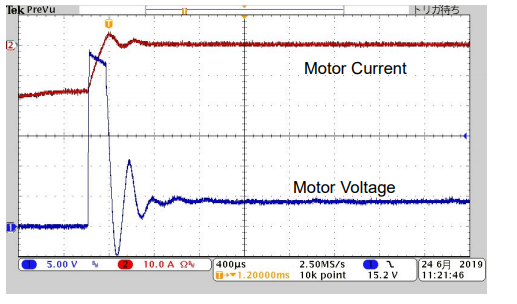
▪ The motor voltage reached approx. 28 Vdc max.
6) When the motor voltage was changed from 12 Vdc to 0 Vdc by the sequence control: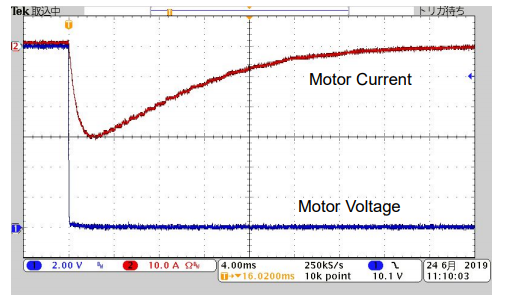
▪ The voltage rising was not found under the sequence control.
7) After the output was turned off: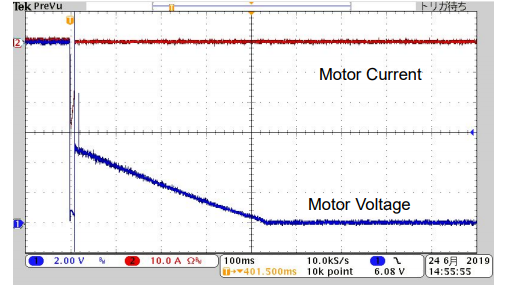
▪ Until the motor was fully stopped, the motor reverse voltage had been applied to PBZ20-20A.
▪ The voltage detection circuit in PBZ20-20A kept closed (connected) even when the output was turned off. This could be a small path to allow a little bit of motor reverse current (discharging current) to flow back to PBZ20-20A.
5. Measurement Summary
▪ When the PBZ20-20A’s output was turned off, the brushed DC motor started functioning like a generator inverting the direction of its current and forcing it into PBZ20-20A.
▪ As an explanation of measurement No. 4; when the output was turned off, the reverse current flew for approx. 10 microseconds. However, the output relay contact in PBZ20-20A was open, so there was no path for the current to flow. This sudden release of energy induced the transient voltage spike.
▪ PBZ20-20A provided the peak current at 45 A for the brushed DC motor. The duration that the output current exceeded 20 A was approx. 8 microseconds.
6. Recommendation
▪ Bipolar power supply can sink a reverse current, while DC power supply cannot. If using a DC power supply and motor, connect an electronic load in parallel to absorb a reverse current.
▪ To protect PBZ20-20A from an overvoltage, wait until an output current reaches 0 A before turning an output off.
7. Conclusion
The above measurement results prove that PBZ20-20A can meet the requirement to run the DC motor to be tested. To identify whether PBZ20-20A can sufficiently power your DC motor or not, we recommend that you carefully read the data sheets or check the specifications.Products Mentioned In This Article:
- PBZ Series please see HERE
How to Balance Battery Module Charge-Discharge
With the recent diversification of battery module application such as for automotive and backup, more and more users want to conduct a battery module charge-discharge test, besides of an individual cell battery test.
As a battery management system has been greatly developed to maximize battery’s capacity, the practical needs to perform evaluations on balancing battery charge-discharge are increased. Here you will find the method to balance the battery charge-discharge by using our DC power supply and electronic load.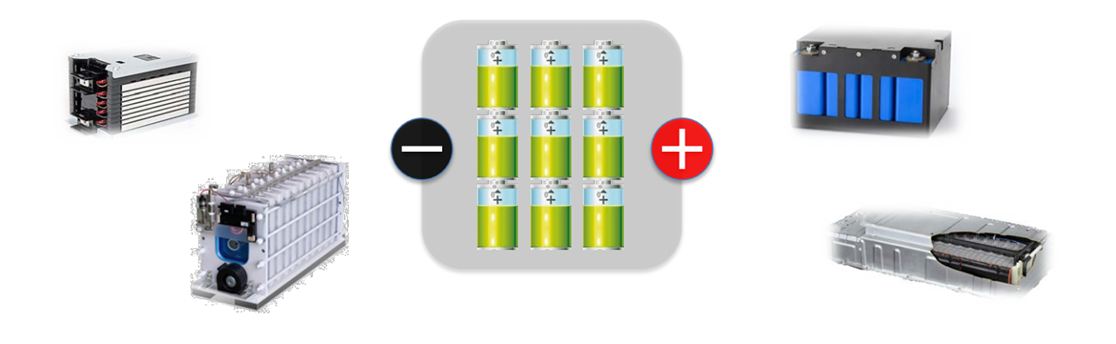
Unbalancing Battery Module Charge
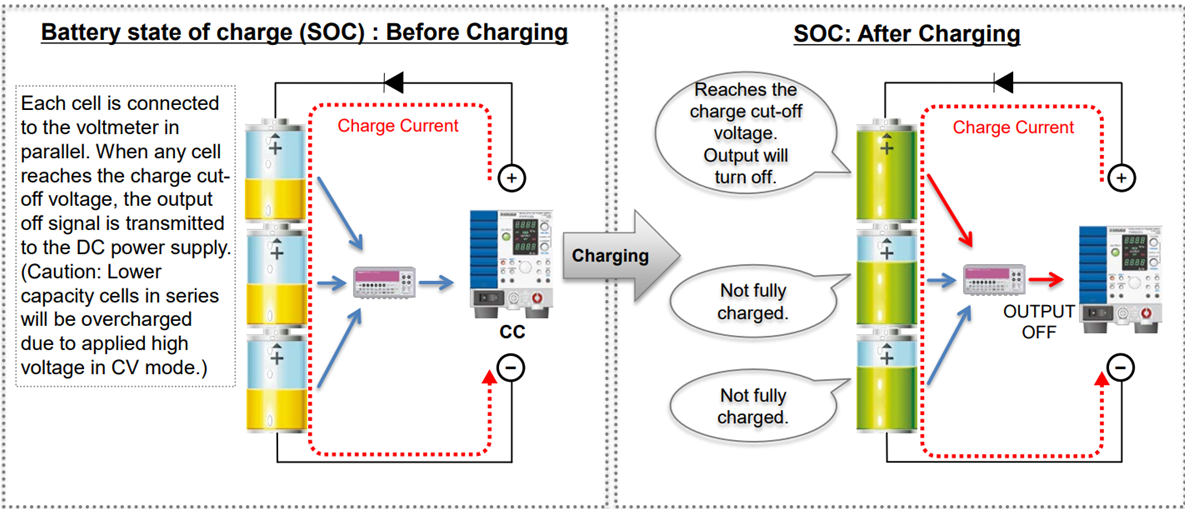
CC flows into each cell with different capacity and SOC unbalance. Cells with less charge capacity always reach the charge cut-off voltage faster. → The battery module cannot reach its full capacity.
Unbalancing Battery Module Discharge
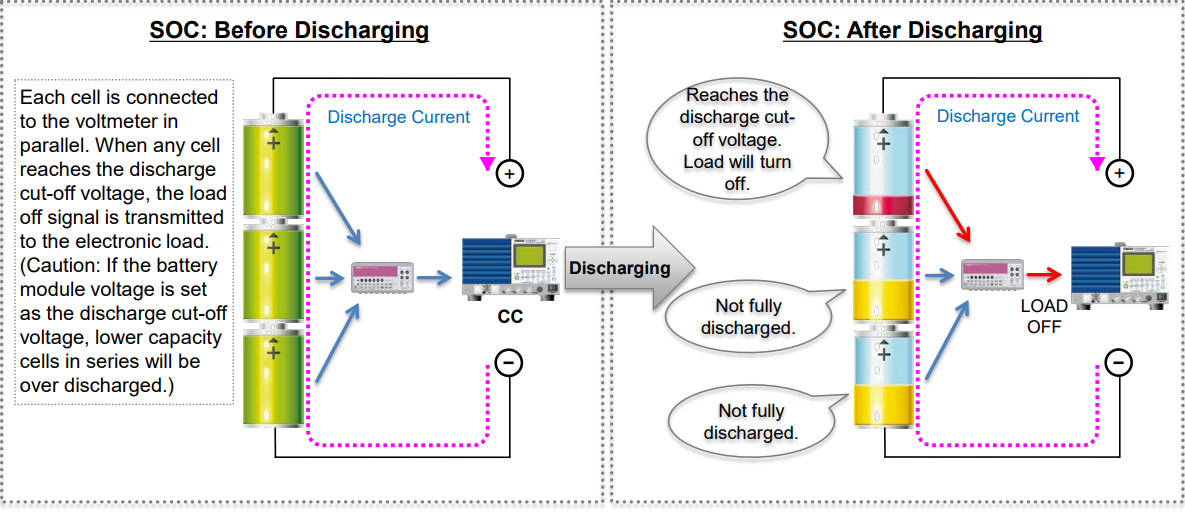
CC is sunk from each cell with different capacity and SOC unbalance. Cells with less discharge capacity always reach the discharge cut-off voltage faster. → The battery module cannot be fully discharged.
Balancing Battery Module Charge-Discharge
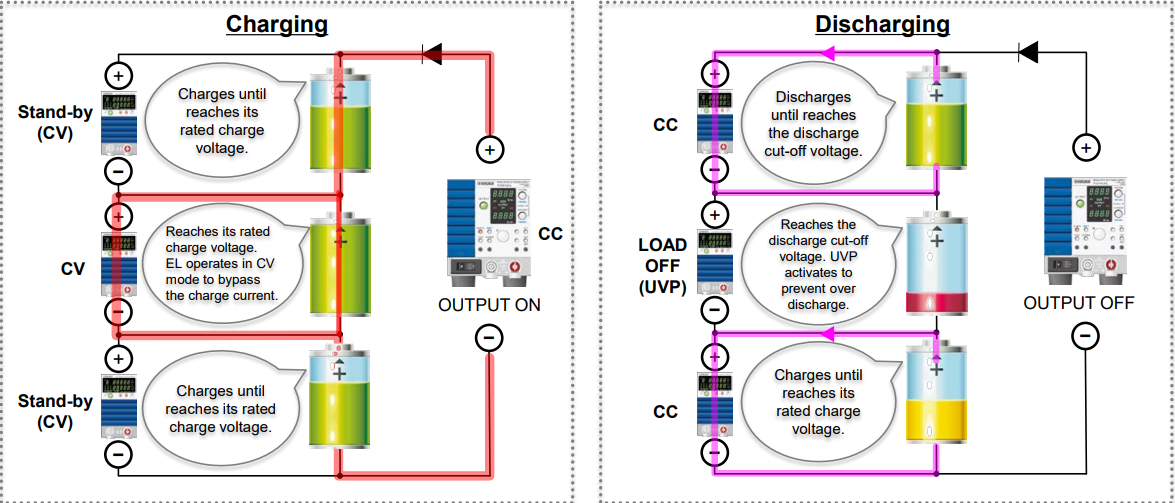
Electronic loads are separately connected to each cell in parallel to perform the balancing charge-discharge.
Balancing Battery Module Charge
Electric loads connected to each cell in parallel operate in CV mode.
Balancing and optimal charge to series cells is available by performing the CC-CV charge; The CC setting is set to a DC power supply and the CV setting is set to electronic loads.
Note: 1) The CC limit for electronic loads should be set higher than the charge current. 2) The electronic load alarm should be linked to the power supply output.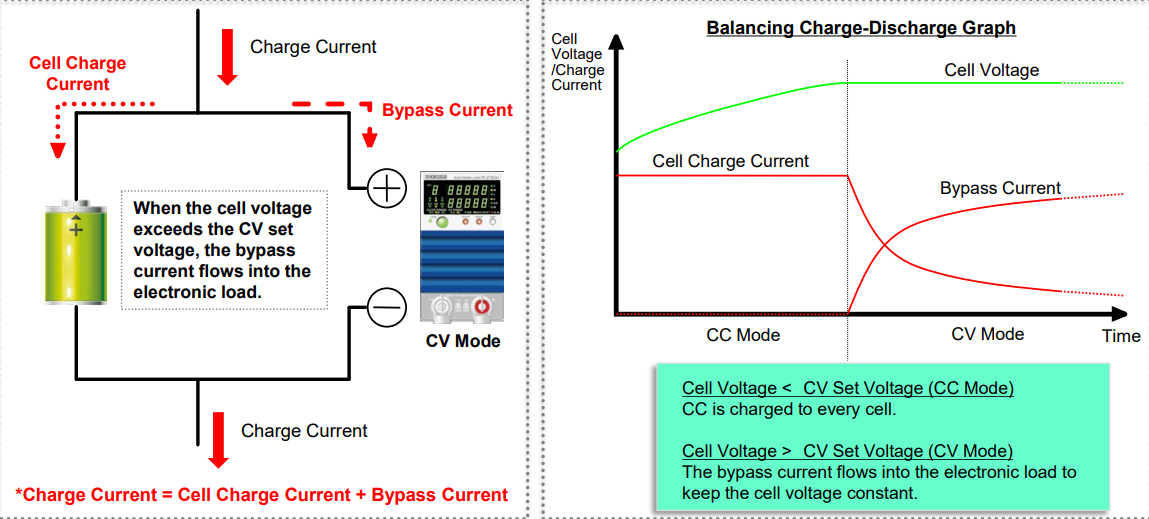
Balancing Battery Module Discharge
Electric loads connected to each cell in parallel operate in CC mode independently.
To stop the discharge; 1) Set the discharge cut-off voltage as under voltage protection (UVP) to turn the load off. 2) Set the discharge cut-off voltage as the CV set value to perform the CC+CV operation. Note: 1) The negative input terminal in each electronic load should be isolated. 2) With the external analogue control, the control signal terminal should be isolated.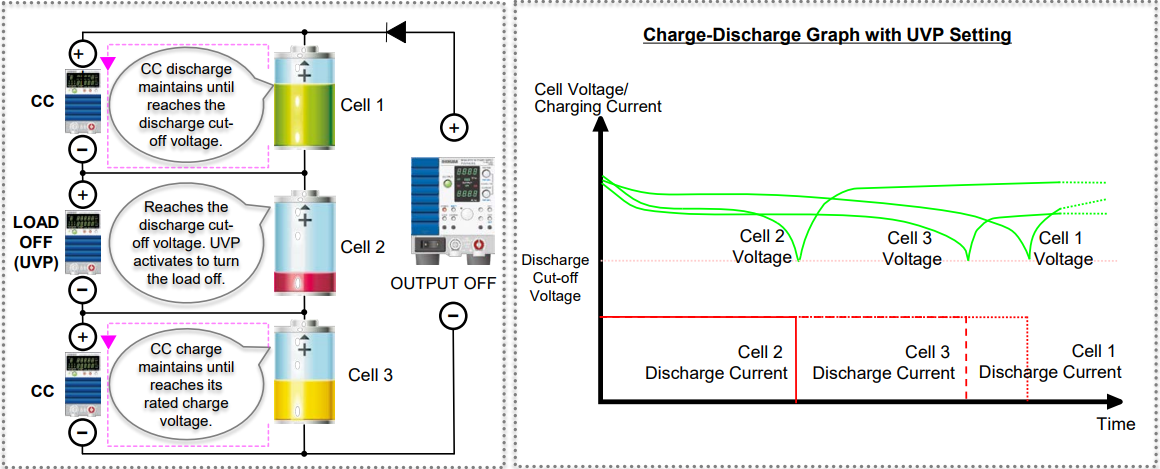
Products Mentioned In This Article:
- DC Power Supplies & Electronic Loads please click HERE


